
MT-VIKI 8 Port VGA KVM Switch
4.5Editor score
Eight VGA computer ports
Includes eight KVM cables
Desktop and button switching
A rackmount KVM switch centralizes control of multiple computers or servers through one monitor, keyboard, and mouse while preserving valuable cabinet space. The strongest options balance useful port capacity, clean rack integration, dependable video performance, flexible switching methods, and accessories that simplify installation. Both standalone switches and integrated LCD consoles suit professional environments.
This guide compares ten rackmount KVM solutions spanning eight-port, sixteen-port, and four-port designs, with VGA and HDMI connections. It examines resolution, USB support, switching controls, EDID handling, rack dimensions, included cables, security features, and compatibility. The list includes budget-friendly switches, feature-rich control units, and premium all-in-one consoles for demanding installations.
Each review explains the product's strongest attributes, practical trade-offs, and ideal operating environment. The top selections highlight a straightforward VGA switch, a versatile HDMI model, and a premium integrated rack console, while the full ranking covers more specialized choices. Product availability and seller terms can change, so verify current specifications and pricing before purchasing.
4.5Editor score

4.0Editor score

4.5Editor score
As an Amazon Associate we earn from qualifying purchases.
The comparison below shows how the ten switches differ in computer capacity, display connections, rack format, control options, and included equipment, making it easier to identify the model that matches a particular server room or control station.



The MT-VIKI 801UK-L is a straightforward eight-port VGA switch with a 4.5 rating, making it a practical choice for operators who want reliable centralized control without an integrated display. It allows one USB 2.0 keyboard, mouse, and monitor to manage eight computers, while its 1U, 19-inch rack design fits neatly into standard server cabinets.
We may earn a commission when you buy through this link, at no additional cost to you.
Its most valuable feature is the complete package of eight combined USB and VGA KVM cables. The included lengths are four 5-foot cables and four 6-foot cables, giving installers flexibility for equipment arranged at different rack depths. A desktop selector and front-button switching provide two practical ways to move between connected systems, and the unit operates without dedicated computer software.
The main limitation is its VGA video interface. It cannot provide the digital signal or broad refresh-rate support associated with modern HDMI and DisplayPort equipment. The stated compatibility list includes several older Windows releases, Linux, and Novell, but buyers should verify the precise requirements of current systems. The product description also mentions a power adapter, while its operating notes indicate that the connected USB and VGA heads can supply power in normal use.
This switch is best for legacy control rooms, industrial systems, security installations, and small server rooms where eight VGA-equipped machines need shared access. It offers a particularly attractive balance of capacity, included accessories, and straightforward operation. Choose it when reliable one-console management matters more than 4K video or advanced remote-control functionality.
Eight integrated KVM cables remove the need to match separate USB and video leads, while the desktop selector makes the switch accessible from beyond the rack. The result is a faster, cleaner installation for IT teams managing multiple conventional PCs or servers.
Front-panel selection and the wired desktop switch cover both local and slightly more distant operation. This uncomplicated approach is useful in offices and control environments where complex programming or software agents would add unnecessary complexity.
We may earn a commission when you buy through this link, at no additional cost to you.
The MT-VIKI 801HK-C is an eight-port HDMI rack switch offering 4K at 30Hz and a 4.2 rating. It combines a rack enclosure with an IR remote, wired desktop selector, front-panel controls, and eight USB-HDMI cables, giving it broad usability for offices, laboratories, and server rooms.
We may earn a commission when you buy through this link, at no additional cost to you.
Four USB 2.0 hub ports allow peripherals such as a keyboard, mouse, and additional USB devices to remain connected to the console. The switch supports wireless keyboards and mice, and its three switching options cover panel buttons, the desktop controller, and the included remote. Plug-and-play operation means administrators do not need to install special software on every connected computer.
Video support reaches 3840 by 2160 at 30Hz, which is appropriate for many single-console workspaces and monitoring stations. It is not equivalent to a high-refresh 4K gaming or professional video workflow, and the shared USB 2.0 hub remains less capable than USB 3.0 equipment. The eight included cables are an important convenience, but their length and connector arrangement should be checked against the physical rack layout.
This is a good choice for a growing eight-computer installation that still values straightforward buttons and remote access. It is especially attractive when the console will be used by more than one operator. Buyers seeking faster USB throughput, 4K at 60Hz, or automatic cycling should consider more specialized alternatives in this ranking.
Operators can use the front panel, a wired desktop controller, or the IR remote. Having local, extended, and remote options makes this switch adaptable to different rack positions and operator habits.
HDMI video at up to 4K and 30Hz produces a modern digital console option for multiple workstations. That makes the unit considerably more future-oriented than a basic VGA-only switch while remaining simple to operate.
We may earn a commission when you buy through this link, at no additional cost to you.
The TESmart 8X1 is a 4.0-rated eight-port HDMI switch whose strongest distinction is control flexibility. It supports 4K at 30Hz, includes EDID emulation on every input, and offers seven ways to operate the console, making it well suited to technical teams that need more than simple front-button switching.
We may earn a commission when you buy through this link, at no additional cost to you.
The switching options include the IR remote, front-panel keys, keyboard hotkeys, mouse-wheel control, RS232 commands, IP commands, and automatic detection mode. Automatic switching can cycle through connected computers at a specified interval, while EDID emulation helps preserve each system's display identity and reduces repeated window rearrangement. Two USB 2.0 ports also allow peripherals such as a scanner, keyboard, mouse, or storage device to be connected.
The unit supports hot-plugging, so administrators can add or remove connected equipment without turning off the associated computer. Eight dedicated 5-foot KVM cables and a remote are included, along with a three-year warranty and technical support. One minor inconvenience is that AAA batteries are not supplied for the remote, so users should keep replacements available if they rely on infrared control.
This is the strongest general-purpose choice for a fixed eight-computer console that benefits from flexible control, stable display settings, and optional automation. It suits control rooms, test laboratories, and server environments where technicians move among systems regularly. It is less attractive for users requiring USB 3.0 or 4K at 60Hz, but its control options and EDID behavior compensate for those limitations in many professional installations.
Per-input EDID emulation helps connected computers retain consistent display information when their inputs are selected. This is particularly useful when window placement and resolution changes would otherwise interrupt ongoing work.
Seven control methods support everything from basic front-panel use to scheduled cycling and serialized integration. Administrators can therefore use the same hardware for daily manual operation or more structured monitoring workflows.
We may earn a commission when you buy through this link, at no additional cost to you.
The MT-VIKI 1708UL is an all-in-one 17-inch LCD console with an integrated eight-port VGA KVM switch and a 3.6 rating. Its defining benefit is consolidation: the monitor, keyboard, touchpad, and switch slide into one 1U drawer, reducing the number of separate devices required inside a cabinet.
We may earn a commission when you buy through this link, at no additional cost to you.
The console is designed for racks with mounting depths from 23.6 to 31.8 inches, so rack depth must be measured before installation. A VGA console output allows an external display to be connected for more comfortable operation without opening the rack. Switching is available through an on-screen menu, keyboard hotkeys, or a push button, and the system supports administrator and user password levels with authorization for up to eight users.
The aluminum interior and steel drawer shell are intended for professional environments, while the included handle and lock improve usability and physical security. Eight USB-VGA cables are supplied, with four measuring 5 feet and four measuring 6 feet. Its compatibility list covers Windows, DOS, Linux, Mac OS versions 8.6 through 10, Unix, and Sun Solaris, though current legacy requirements should be confirmed.
This model suits server rooms, security monitoring centers, and industrial installations where an integrated console is more valuable than digital display standards. The 3.6 rating suggests some buyer satisfaction but less consensus than the leading options. It is best for organizations committed to VGA equipment and willing to verify rack depth, display requirements, and legacy software compatibility in advance.
Integrating the display, keyboard, touchpad, and eight-port switch dramatically simplifies cabinet organization. It also leaves more room for servers and network equipment, which is valuable in compact installations.
Administrator and user password levels allow access to be divided between supervisors and regular operators. The drawer lock adds a physical barrier to accidental or unauthorized use.
We may earn a commission when you buy through this link, at no additional cost to you.
The MT-VIKI 1568HL earns a 4.6 rating, the highest among the integrated options in this guide. It combines a 15.6-inch 1920 by 1080 display at 60Hz, keyboard, touchpad, and eight-port HDMI switch in a single 1U rack drawer, offering a modern and space-efficient server-room console.
We may earn a commission when you buy through this link, at no additional cost to you.
Two sets of rack rails accommodate a broad range of cabinet depths. Short rails fit racks from 18.9 to 23.6 inches, while long rails cover 23.6 to 31.5 inches. Cable clearance can be tight below 600 millimeters, making careful measurement essential. An HDMI console output permits connection to an external monitor, while OSD, hotkey, and push-button switching provide three operating methods.
Password protection includes separate administrator and user levels, with authorization for up to eight users and an administrator viewing mode. The aluminum interior and rugged steel enclosure are complemented by a handle and lock. Eight 5-foot USB-HDMI KVM cables, a power adapter, both rail sets, and a manual are included, reducing the need to source core installation accessories separately.
This console is ideal for organizations that want one digital console to manage eight HDMI-equipped systems without installing separate display, keyboard, and switch hardware. Its 1080p panel is not intended to replace a high-resolution editing display, but for console access and administration it offers a sensible balance. Verify depth, handle clearance, and monitor placement before ordering.
Separate short and long rail sets make the console adaptable to both shallow and deeper network cabinets. Measuring the enclosure, rails, and cable bend radius helps avoid installation problems.
The integrated HDMI switch, 1080p screen, keyboard, and touchpad reduce cabinet clutter. It also gives administrators a consistent, purpose-built interface for routine server and workstation maintenance.
We may earn a commission when you buy through this link, at no additional cost to you.
The TRENDnet TK-803R is an eight-port 1U rack switch with a 4.0 rating, designed for installations still using VGA and mixed USB or PS/2 equipment. It lets one keyboard, monitor, and mouse control up to eight computers or servers, with hotkey and push-button switching.
We may earn a commission when you buy through this link, at no additional cost to you.
The computer side uses eight female VGA HDB-15 connectors and USB connectivity, while the console supports USB and PS/2 for the keyboard and mouse. Video output is specified up to 2048 by 1536, which is suitable for conventional server administration and security-monitor use. Operating-system support includes Windows, Linux, Unix, and Mac OS.
A notable advantage is the stated compliance with NDAA and TAA for government customers in the United States and Canada. TRENDnet also provides two years of manufacturer protection and technical support during normal business hours. The tradeoff is that the KVM cables are not supplied; compatible 6-foot, 10-foot, and 15-foot options must be purchased separately, and their availability should be confirmed before installation.
The TK-803R is most appropriate for organizations maintaining an established fleet of older servers and workstations. Its broad legacy interface support may be more useful than modern HDMI conveniences in a facility that has not upgraded its endpoints. It is less compelling for a new installation because separate cables add work and the video standard is dated.
USB and PS/2 support on the console side allows administrators to use compatible legacy peripherals. This is useful during phased upgrades when older and newer systems coexist.
The stated NDAA and TAA compliance makes this model easier to evaluate for eligible public-sector deployments. Users should still confirm that the complete proposed installation meets current procurement requirements.
We may earn a commission when you buy through this link, at no additional cost to you.
The ANGEEET 16 Port HDMI KVM is built for high-density control, allowing one monitor and one keyboard-mouse set to manage sixteen computers. With a 4.1 rating, 4K at 60Hz support, six USB 3.0 ports, and EDID simulation, it offers more bandwidth and capacity than most eight-port models in this guide.
We may earn a commission when you buy through this link, at no additional cost to you.
The unit also includes an SD/TF card slot, RS232 control, and a wired remote with a digital display. Panel buttons provide direct selection of inputs, while LEDs identify the active device. EDID simulation stores and maintains resolution and refresh-rate information, helping maintain window positions as operators move among the sixteen systems. Video modes include 4K at 60Hz, backward-compatible 4K at 30Hz, and 2560 by 1440 at 120Hz.
USB 3.0 data transfer is listed at up to 5Gbps, allowing shared storage and other peripherals to move data considerably faster than on a USB 2.0 console. Sixteen cables are included in several lengths, along with the remote, power adapter, and mounting hardware. The 12V power adapter must be connected, and the bundled 1.5-meter remote may be less convenient than an infrared control across a large room.
This is the strongest option in the list for racks that need to consolidate sixteen digital systems. Its combination of 60Hz 4K, high-speed USB, card-reader access, and serialized control is particularly relevant to testing laboratories, control rooms, and dense server environments. It is less suitable when sixteen inputs are unnecessary or when every connected device must be accessed without a dedicated switch.
High port density allows administrators to simplify a crowded rack without stacking several basic switches. The one-rack-unit enclosure preserves vertical capacity for servers and network equipment.
Six USB 3.0 ports support faster transfers for shared storage, card media, and other peripherals. This is a meaningful advantage over USB 2.0 switches when technicians regularly move large files.
We may earn a commission when you buy through this link, at no additional cost to you.
The MT-VIKI 8 Port HDMI Console is a rack-mounted 8×1 switch with a 3.5 rating. It manages up to eight HDMI computers through a single monitor, keyboard, and mouse at up to 4K and 30Hz, and includes four USB hub connections for shared peripherals.
We may earn a commission when you buy through this link, at no additional cost to you.
Three switching methods are provided: front-panel buttons, a wired desktop selector, and an IR remote. The selector and remote allow control from a position farther from the rack, while the buttons provide immediate local access. Eight USB-and-HDMI integrated cables are included, and their USB pigtails carry data and power to the connected hosts. No special software is required.
The switch is listed as compatible with Windows 10, 8, 8.1, 7, Vista, XP, Mac OS, and Linux, as well as DDC and automatic identification. A 3.5 rating indicates that some buyers may have encountered issues or simply left fewer reviews. Compared with the other MT-VIKI HDMI model in this list, this product has the same general video tier and included accessories but a lower customer rating.
It is a reasonable option for an eight-computer office or test bench where operators need basic remote selection and a complete set of cables. The low rating and lack of listed EDID emulation make it less compelling for critical monitoring, automated workflows, or environments where display settings must remain perfectly consistent.
The wired desktop selector and IR remote make the console more convenient when the rack is enclosed or installed near a work surface. Operators do not need to reach the front panel for every computer change.
Eight integrated HDMI and USB leads create a consistent connection standard across every host. This reduces component count and helps standardize installation across a multi-computer workstation.
We may earn a commission when you buy through this link, at no additional cost to you.
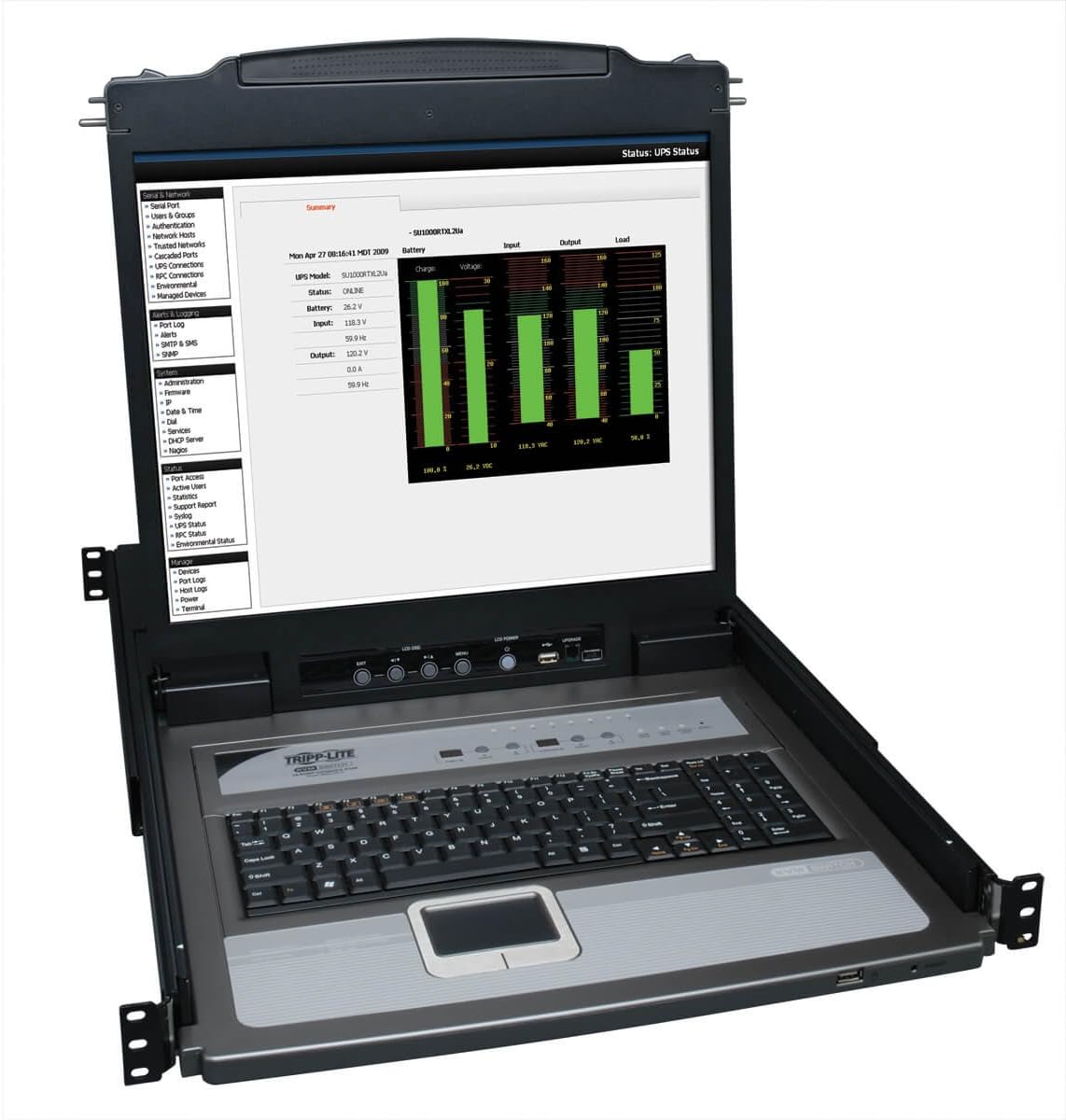
The Tripp Lite NetDirector B020-U08-19-K is a premium all-in-one console with a 4.5 rating. It combines a 19-inch LCD, keyboard, touchpad, and eight-port KVM switch in a 1U rack enclosure, offering a large dedicated workspace for server administration and monitoring.
We may earn a commission when you buy through this link, at no additional cost to you.
Eight P778-series USB/PS/2 combo cable kits are included, providing the connections needed for the eight managed systems. Additional ports allow an external PS/2 or USB console, or a Tripp Lite B051-000 remote-access unit, to be connected. This makes the console suitable as the central physical control point in a larger network architecture rather than an isolated keyboard-monitor device.
Two-level password security adds administrative and user access control, an important feature in shared technical environments. The switch can also be expanded through daisy-chaining as many as 31 additional B022-U16 KVM switches, allowing the stated total capacity to reach 504 computers. The product includes a one-year limited manufacturer warranty and is supported by Eaton's technical team.
Its principal compromise is its legacy-oriented interface generation. USB/PS/2 connectivity and a 19-inch LCD prioritize a complete, manageable console over current digital standards. For organizations operating established server fleets, this can be an advantage because it provides a full rack-native control surface and substantial expansion capability. For new deployments built entirely around HDMI or USB-C, a modern digital console may be easier to integrate.
The 19-inch display provides a roomy workspace for logs, management consoles, and multi-window monitoring. Integrated keyboard and touchpad components reduce the number of separate peripherals that must be stored and connected.
Password tiers and extensive daisy-chain support suit installations managed by multiple administrators. The ability to add remote-access hardware further extends the console beyond a purely local workflow.
We may earn a commission when you buy through this link, at no additional cost to you.
The Tripp Lite B042-004 is a four-port 1U rack switch with a 3.4 rating. It is aimed at compact installations where one VGA monitor and a USB or PS/2 keyboard and mouse need access to four computers or servers, offering an on-screen display for control.
We may earn a commission when you buy through this link, at no additional cost to you.
It supports video resolutions up to 2048 by 1536 and works with major operating systems. P780-series USB/PS/2 combo cable kits allow users to connect either interface without separate adapters, although the listed bundle description does not state that cables are included. The standard 19-inch rack size and included mounting hardware simplify physical integration.
Expansion is a notable strength. By daisy-chaining as many as 15 additional B042-series switches, the stated maximum expands to 244 computers. That makes the unit a sensible building block for facilities that begin with a small local console and later need broader coverage. Its four local ports may be limiting, however, for operators who want every machine available from one rack unit.
This switch works best for a small, established cluster of legacy computers or servers and for administrators who appreciate a graphical on-screen menu. The low 3.4 rating and older interface design make it less attractive for a new, modern deployment. Confirm cable requirements and operating-system compatibility before purchasing, particularly if the installation depends on older equipment.
Four local ports are sufficient for many small labs, offices, and maintenance bays. The 1U form factor preserves rack space without attempting to provide the complexity of a large enterprise console.
The architecture can scale through additional B042-series units, making it a flexible starting point. Expansion planning should account for cable routing, cascaded switch order, and the number of operators who need simultaneous access.
We may earn a commission when you buy through this link, at no additional cost to you.
The right rackmount KVM switch depends on your computer count, display standard, rack dimensions, operating systems, peripheral needs, and preferred control method. Use the factors below to narrow the field before checking the final specifications and included accessories.
Start with the number of systems that must be controlled from one console. Four-port switches suit small clusters, while eight-port models cover most offices, labs, and moderate server rooms. A sixteen-port design is appropriate when rack density matters and each endpoint should remain available from a single unit. Avoid paying for unnecessary capacity, but leave room if the connected fleet is likely to expand.
Choose the smallest switch that comfortably meets present and foreseeable needs. Port count should be matched to actual hosts rather than cable inventory, and the physical rack space should also be checked.
Video standards determine which computers and displays can be connected. VGA works with many legacy systems but carries lower practical resolution and no digital audio. HDMI supports digital displays, with listed options reaching either 4K at 30Hz or 4K at 60Hz. Check the resolution, refresh rate, and monitor requirements of every endpoint rather than relying only on the switch headline.
For new digital installations, HDMI is generally the more relevant choice. VGA remains useful for older servers, industrial controls, and mixed fleets where replacement would be impractical.
A standalone switch connects to a monitor, keyboard, and mouse that remain outside or elsewhere in the rack. An integrated console adds a pull-out display, keyboard, and touchpad within a one-rack-unit drawer. Standalone units are usually simpler for routine access, while integrated consoles reduce cabinet clutter and provide a dedicated local control surface.
Consider operator workflow, available workspace, and whether equipment must be visually hidden when not in use. Integrated drawers also require accurate rack-depth measurements.
A standard 19-inch, one-rack-unit enclosure is only half the installation decision. Integrated consoles must also fit the cabinet's available depth, and their handles, rails, cables, and display movement need clearance. Some products support adjustable rails or offer multiple rail sets, while others are restricted to a narrower range. Measure both the rack and the equipment rather than relying on nominal dimensions.
For shallow cabinets, prioritize models explicitly designed for shallow mounting. For deep racks, confirm that the included rails and attached power cables can occupy the extra space without preventing drawer movement.
Front-panel buttons are the simplest option, while hotkeys support faster keyboard-driven changes. Wired desktop selectors and infrared remotes extend control to operators positioned away from the rack. More advanced units add mouse-wheel switching, automatic detection, serial commands, network commands, or timed cycling. Choose methods that match how technicians actually work instead of paying for controls that will remain unused.
Also consider remote type. Infrared can be affected by line of sight and interference, while a wired remote offers a fixed connection. RS232 or IP command support may be valuable for scripted or centralized administration.
The console USB version affects compatible keyboards, mice, storage devices, scanners, and transfer speeds. USB 2.0 is sufficient for standard administration and many shared peripherals, while USB 3.0 is preferable for large file transfers. Some switches add extra hub ports or card-reader slots, allowing removable media to remain connected to the console. Check whether the connected peripherals draw power from the host or require a separate powered hub.
For routine server access, prioritize reliable keyboard and mouse support. For media-heavy workflows, test the stated USB bandwidth and confirm that storage devices remain linked to the correct host after switching.
EDID emulation helps computers retain display identity, resolution information, and window placement when the selected input changes. This is valuable in control rooms where interrupted layouts slow down operators. Compatibility is broader than a simple operating-system list: verify VGA or HDMI, USB or PS/2, keyboard standards, graphics outputs, and any special server-management interfaces. Legacy hardware deserves especially careful verification.
Look for clear support documentation and a practical warranty. When compatibility is mission-critical, confirm the exact hardware and operating systems involved rather than relying on broad claims such as universal or plug-and-play support.
Some products include a complete set of KVM cables, while others require separate purchases. Check the number, length, and connector type of each lead, especially for integrated consoles and racks with unusual cable-routing needs. Remote controls may also arrive without batteries, and mounting ears, screws, adapters, desktop selectors, or manuals may differ between models. Warranty length and direct technical support are useful indicators of manufacturer support.
Treat the package as part of the product, not an afterthought. A lower-cost switch with no cables may cost more overall than a complete bundle, while a longer included set can simplify installation and reduce troubleshooting.
Before installation, power down or safely disconnect the computers that will be attached, then mount the switch or console in a stable 19-inch rack. For an integrated drawer, measure rack depth and confirm the selected rails support the enclosure. Leave enough room behind the unit for power, data, and video cables to bend without pulling connectors.
Connect the monitor and keyboard first, followed by each KVM cable to its corresponding computer. Attach USB, VGA, or HDMI leads according to the switch's design, then apply power to models that require an external adapter. Test each input from the front panel before installing all rack equipment. If the product supports a desktop selector, remote, or serial controller, configure and verify those controls after the basic console works.
During operation, switch using the method best suited to the task and avoid repeatedly reconnecting cables unless hot-plug support is explicitly documented. Keep vents unobstructed, avoid placing liquids near the console, and do not overload USB hubs beyond their supported device count. For LCD drawer models, open and close the handle evenly and never force the display. Periodically inspect connectors, tighten loose mounting hardware, and confirm that cables retain adequate strain relief.
A rackmount KVM switch lets one monitor, keyboard, and mouse control multiple computers or servers. It mounts in a standard 19-inch equipment rack and usually includes several input connections plus a shared console. Some models also integrate a pull-out LCD, keyboard, and touchpad for direct local administration.
A rackmount switch is better when equipment is housed in a server cabinet and space, organization, or remote access matters. A desktop KVM may be more convenient when all computers sit on a desk and no rack is involved. The choice depends more on physical layout and cable routing than on basic switching performance.
Only if the switch explicitly supports both interfaces or uses appropriate compatible adapters. Most models have a single video standard across all inputs, so matching input and console connections is important. Check the product specifications carefully because a nominal adapter solution may not preserve every supported resolution or control feature.
EDID emulation presents consistent display information to connected computers. This can reduce changes to resolution, refresh rate, and window arrangement when a user switches between inputs. It is especially helpful in multi-computer control rooms where visual continuity and fast task switching are important.
That depends on the model. Several MT-VIKI products include eight HDMI or VGA KVM cables, while the TRENDnet and Tripp Lite switches described here do not clearly include a full cable set. Check the package list, cable quantity, and required length before ordering so the installation is not delayed by missing leads.
Integrated consoles need enough depth for the drawer, rails, power adapter, and cable bend radius. Products in this guide fit different ranges, including 18.9 to 31.5 inches and 23.6 to 31.8 inches, but the exact configuration matters. Measure the cabinet and review warnings about clearance in shallow racks.
Most switches operate at the hardware level and therefore work across different supported operating systems without special software on each computer. The important checks are video connectors, USB or PS/2 standards, keyboard behavior, and any specialized management requirements. Broad compatibility claims should still be verified against the exact systems in the intended installation.
Automatic switching is useful for unattended monitoring displays, demonstrations, or environments where operators need the next system to appear automatically. Manual controls are usually better for administration because technicians can keep a connection active while troubleshooting. Products such as the TESmart model offer both, while others focus on manual panel, selector, or remote switching.
The MT-VIKI eight-port VGA switch stands out as the best budget option because it combines eight inputs, a complete cable set, and two simple switching methods. The TESmart 8X1 earns the Editor's Choice distinction for its EDID emulation, automatic switching, and seven control methods, while the Tripp Lite 19-inch NetDirector provides the most expansive premium console with security and large-scale daisy-chaining.
Prioritize the interface your computers actually use, the number of hosts that must remain available, and the depth of the rack. HDMI models suit modern digital equipment, VGA remains practical for legacy systems, and sixteen-port designs provide useful density. Integrated consoles deserve additional scrutiny regarding depth, external-monitor placement, and included rails, while standalone switches offer a simpler path for technicians who already have a dedicated display and peripherals.
Finally, recheck the current specifications, package contents, warranty terms, and seller information before ordering. Interfaces, firmware, and included accessories can change over time, and current user feedback may reveal details not covered in a product summary. Comparing the final listing with your server-room layout and equipment inventory is the surest way to avoid incompatibility and unnecessary expense.