
GIGABYTE GC-WBAX210
4.6Editor score
Intel AX210 Wi-Fi 6E module
Tri-band wireless support
Bluetooth 5.2 connectivity
Up to 2400Mbps wireless speed
Discover the best PCIe Bluetooth cards for desktop PCs, with 10 expert picks compared for Wi-Fi speed, Bluetooth version, range, security, and setup ease.
A PCIe Bluetooth card gives a desktop PC a fast, native way to join Wi-Fi networks and connect peripherals such as headsets, keyboards, controllers, and mice. The best model balances wireless performance, antenna design, Bluetooth capability, driver support, security, and compatibility with your case and operating system.
This guide compares ten PCIe Bluetooth cards using their published specifications, including Wi-Fi generation, supported bands, maximum wireless rates, Bluetooth version, antenna arrangement, and platform requirements. The list covers affordable dual-band options through Wi-Fi 6E and Wi-Fi 7 models for newer routers and Windows 11 systems.
Each review explains who the card suits, where it stands out, and where compromises remain. The top selections include a budget-friendly Gigabyte Wi-Fi 6E option, a well-balanced TP-Link Archer TX3000E, and a feature-rich MSI Wi-Fi 7 card. Current prices and availability can change, so check the linked listing before purchasing.
4.6Editor score

4.7Editor score

4.3Editor score
The comparison below highlights the major differences among all ten cards, including wireless generation, Bluetooth version, peak throughput, antenna design, and operating-system support. These details make it easier to match a card to your router, desktop, and preferred peripherals.
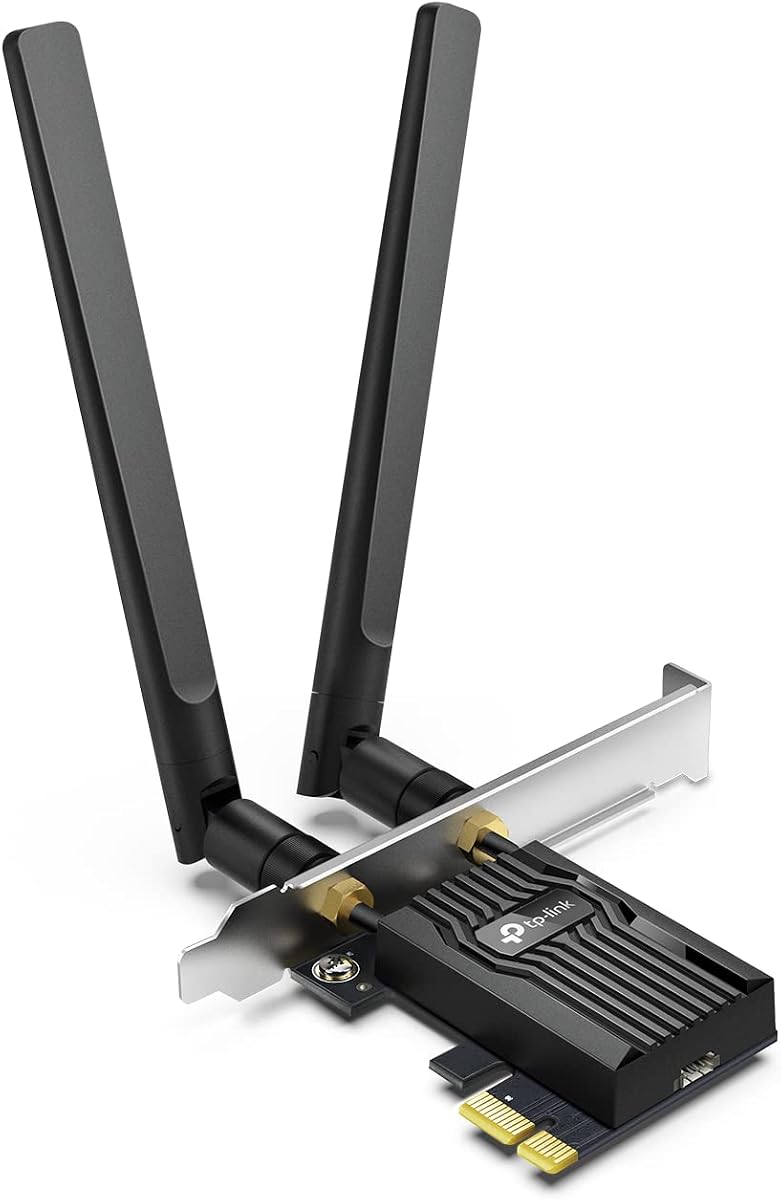

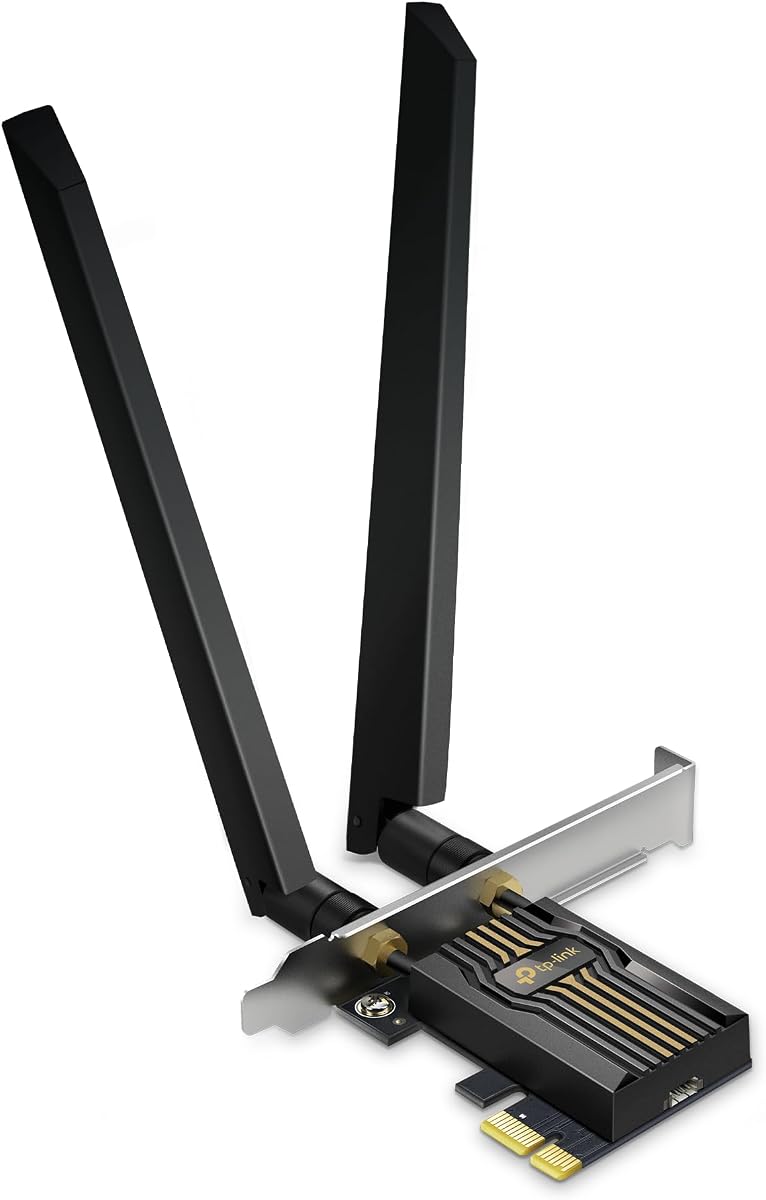


The TP-Link Archer TX55E is a dual-band Wi-Fi 6 PCIe card with a 4.5 rating and a clear focus on dependable desktop connectivity. It combines an AX3000-class wireless profile with Bluetooth 5.2, two external high-gain antennas, WPA3 support, and both standard and low-profile mounting brackets. That combination makes it a practical upgrade for desktops that need modern networking without moving to Wi-Fi 6E or Wi-Fi 7.
We may earn a commission when you buy through this link, at no additional cost to you.
Its strongest feature is the balance between performance and flexibility. The card can reach up to 2402Mbps on the 5GHz band and 574Mbps on 2.4GHz, while OFDMA and MU-MIMO improve efficiency when several devices are communicating. The two external antennas can be positioned more effectively than a small internal antenna, particularly in a metal desktop case. Bluetooth 5.2 supports common accessories including controllers, headphones, keyboards, and mice.
The main limitation is that this card remains a dual-band model. It cannot use the 6GHz spectrum available through Wi-Fi 6E and Wi-Fi 7 networks, so its practical ceiling is lower than that of the tri-band cards in this guide. Bluetooth also depends on the included cable being connected to an internal front-panel USB header, which means the feature will not work in a purely cable-free installation. The included bracket options help with different case layouts, but antenna placement still requires some planning.
This is a good fit for a desktop owner who wants strong 2.4GHz and 5GHz performance, convenient Bluetooth, and flexible antenna placement without needing the newest wireless generation. Choose it if your router remains on dual-band Wi-Fi 6 or if a straightforward, balanced PCIe upgrade is the priority. For a Wi-Fi 6E-capable home network, consider one of the tri-band alternatives instead.
Two signal-boosting external antennas give users more freedom than a fixed internal antenna. Positioning them outside or near the front of a metal chassis can improve reception, although actual results depend on the desktop, router, walls, and nearby interference.
Bluetooth 5.2 is suitable for everyday controllers, headsets, keyboards, and mice. The required internal USB connection should be arranged before the card is secured, because a disconnected cable will leave Bluetooth inactive.
We may earn a commission when you buy through this link, at no additional cost to you.
The TP-Link Archer TX3000E stands out as the best overall PCIe Bluetooth card in this guide because it combines a strong 4.7 rating with balanced Wi-Fi 6 performance, Bluetooth 5.3, and an unusually flexible antenna arrangement. It is designed for Windows 11 and Windows 10 64-bit systems, giving it broader current platform support than several Windows 11-exclusive Wi-Fi 7 options.
We may earn a commission when you buy through this link, at no additional cost to you.
Wireless performance reaches up to 2402Mbps on 5GHz and 574Mbps on 2.4GHz. OFDMA and MU-MIMO help the adapter remain responsive in congested environments, while the Intel-based Wi-Fi 6 platform provides a useful mix of speed and efficiency. The magnetic antenna base can be placed wherever it produces the best reception, and a low-profile bracket supports compact cases. Bluetooth 5.3 allows the card to handle controllers, headsets, and input devices without a separate USB adapter.
There are two important caveats. First, this remains a dual-band card, so a Wi-Fi 6E or Wi-Fi 7 router cannot expose its 6GHz network to the adapter. Second, TP-Link notes that the included Bluetooth 5.3 capability requires a firmware download from its support page. Drivers can be obtained online or from the supplied disc, and users without a disc drive should use the website. The internal USB header must also be connected to activate Bluetooth.
The Archer TX3000E is the most broadly appealing choice for someone who values a proven rating, mature Wi-Fi 6 performance, useful Bluetooth 5.3, and antenna flexibility. It works especially well for desktop gaming, home-office, and general productivity builds. Buy it when dual-band Wi-Fi 6 meets your needs; step up to Wi-Fi 6E only if your router and Windows setup can make meaningful use of the 6GHz band.
The detachable magnetic base allows the external antennas to be moved away from sources of interference or positioned near a clearer signal path. It is especially useful in large metal cases where the location of the motherboard's PCIe slot is not ideal for radio reception.
Bluetooth 5.3 provides current wireless peripheral support while keeping the card on a widely compatible dual-band platform. Firmware installation is a small extra step, but it allows the adapter to use the newer Bluetooth features described by the manufacturer.
We may earn a commission when you buy through this link, at no additional cost to you.
The GIGABYTE GC-WBAX210 is the best budget selection in this roundup, offering a 4.6 rating and an established Intel AX210-based design at a notably accessible price point. Despite being an economical PCIe Bluetooth card, it supports Wi-Fi 6E across the 2.4GHz, 5GHz, and 6GHz bands, making it a sensible way to gain tri-band capability without moving to a premium Wi-Fi 7 model.
We may earn a commission when you buy through this link, at no additional cost to you.
The card's Intel AX210 module supports dual-stream wireless connectivity in all three bands and delivers a maximum connection rate of up to 2400Mbps. IEEE 802.11acR2plusax compliance provides backward compatibility with common legacy Wi-Fi standards. Bluetooth 5.2 covers standard desktop peripherals such as keyboards, mice, headsets, and controllers. Its simplicity is appealing to builders who want a recognizable chipset and tri-band support without paying for the newest platform.
Budget status does not make the card feature-complete. It offers Bluetooth 5.2 rather than the 5.3 or 5.4 found on several competitors, and the published specifications do not highlight a magnetic antenna base or the same flexible external placement options. The 2400Mbps maximum is also below the combined theoretical figures advertised by some Wi-Fi 6E and Wi-Fi 7 cards. Actual throughput will depend on the router, bandwidth available in the 6GHz band, congestion, and distance.
The GC-WBAX210 is a strong recommendation for a budget-conscious desktop owner who wants more than a basic dual-band adapter. It is particularly useful when a Wi-Fi 6E router is already available but spending on a flagship Wi-Fi 7 card is unnecessary. For basic Bluetooth peripherals and reliable tri-band Wi-Fi, it delivers the most important capabilities in a restrained package.
Support for 2.4GHz, 5GHz, and 6GHz is the defining value here. The adapter can use the 6GHz band when the router and network configuration permit it, giving budget buyers access to newer, less crowded spectrum.
The built-in Intel AX210 module is a familiar platform with broad use in PCIe wireless adapters. That familiarity can make driver and compatibility research easier, although buyers should still confirm support for their specific desktop and operating system.
We may earn a commission when you buy through this link, at no additional cost to you.
This Intel AX210 Wi-Fi 6E card delivers a 4.5 rating and combines tri-band wireless capability with Bluetooth 5.3. Its published maximum speed of 5400Mbps reflects the combined theoretical limits across 6GHz, 5GHz, and 2.4GHz, making it one of the faster non-Wi-Fi 7 options in the list. The included high-gain antennas and USB Bluetooth cable make it a complete desktop upgrade package.
We may earn a commission when you buy through this link, at no additional cost to you.
The card is aimed at users who want more than the 2400Mbps ceiling of a conventional dual-band AX3000 adapter. The 6GHz band can provide additional bandwidth and access to less crowded channels, while 5GHz and 2.4GHz maintain compatibility with a wider range of routers. OFDMA, MU-MIMO, and WPA3 support reinforce the card's suitability for busy modern networks, and Bluetooth 5.3 is appropriate for common wireless accessories.
The most important limitation is that hardware capability alone cannot activate 6GHz networking. The product information specifically notes that full 6GHz functionality requires a Wi-Fi 6E router and Windows 11, while the general setup is described for Windows 10 and 11. Its stated 5400Mbps total rate is also a theoretical maximum rather than a guarantee of real-world file transfers. Like most internal desktop adapters, Bluetooth requires the supplied USB cable to be attached to an available header.
This is a compelling choice for a desktop owner who wants a tri-band AX210 card and Bluetooth 5.3 but does not need Wi-Fi 7. It offers more flexibility than the Gigabyte GC-WBAX210, although the latter may suit buyers focused primarily on value. Confirm that your desktop has a free PCIe slot, an accessible internal USB header, and a router that can take advantage of 6GHz before choosing.
The 6GHz band adds valuable capacity for compatible networks, particularly in crowded areas. A suitable Wi-Fi 6E router and Windows 11 are needed to exploit it, so the card is best matched to a deliberately modern setup rather than an older home network.
Bluetooth 5.3 works with controllers, headsets, keyboards, and mice. Routing the included cable to a front-panel USB header makes the Bluetooth radio visible to the operating system after drivers are installed.
We may earn a commission when you buy through this link, at no additional cost to you.
The TP-Link Archer TBE552E is a high-specification Wi-Fi 7 PCIe card with a 4.4 rating, Bluetooth 5.4, and tri-band throughput that reaches up to 5764Mbps on 6GHz. It also supports 2882Mbps on 5GHz and 688Mbps on 2.4GHz. For a new desktop built around a Wi-Fi 7 router, it provides access to modern features such as Multi-Link Operation, Multi-RU, and 4K-QAM.
We may earn a commission when you buy through this link, at no additional cost to you.
Its two high-gain antennas are designed to extend desktop signal range, while OFDMA and MU-MIMO help the adapter serve multiple devices efficiently. The 320MHz channel capability is one of the most attractive aspects of the card, allowing use of wider 6GHz channels when the router and local conditions support them. Bluetooth 5.4 is intended for reliable connections with controllers, headphones, keyboards, and mice, and WPA3 support protects wireless credentials.
Compatibility is the central trade-off. TP-Link states that this card is designed exclusively for Windows 11 and is not compatible with Windows 10 or earlier. Its major wireless features also require a Wi-Fi 7 router, so installing it on an older network will not create Wi-Fi 7 performance. As with many PCIe adapters, Bluetooth depends on connecting the supplied USB lead to a front-panel USB header. Standard and low-profile brackets are included, helping it fit full-size and compact mini-tower cases.
The Archer TBE552E makes sense for a builder who wants a forward-looking desktop network and Bluetooth 5.4 rather than spending on a second-generation Wi-Fi 6 adapter. Its advantages are strongest when the router, operating system, and internet plan can all support high-throughput wireless. For a more established Windows 10 or dual-band setup, the TX3000E may be the more coherent purchase.
Multi-Link Operation can combine multiple frequency bands to improve throughput, latency, and reliability. The benefit is most visible on a modern Wi-Fi 7 router and in demanding applications, but older infrastructure will not expose its full potential.
Bluetooth 5.4 is a sensible match for current controllers, audio gear, and input devices. The card's internal USB cable must be connected to enable the Bluetooth side of the adapter, even though Wi-Fi operates directly through PCIe.
We may earn a commission when you buy through this link, at no additional cost to you.
The TP-Link Archer TXE75E pairs an Intel AX210-based Wi-Fi 6E platform with Bluetooth 5.3, two external antennas, and a magnetic base. Its 4.6 rating places it among the strongest performers in this guide. The card is well suited to a desktop that needs flexible antenna positioning and access to 6GHz without moving all the way to Wi-Fi 7.
We may earn a commission when you buy through this link, at no additional cost to you.
Published band rates reach 2402Mbps on 6GHz, 2402Mbps on 5GHz, and 574Mbps on 2.4GHz. The magnetic base allows the antennas to be placed in a more favorable position, a useful feature in desktop cases where the PCIe slot sits near metal panels or other interference sources. OFDMA and MU-MIMO target lower congestion during busy activity, WPA3 improves wireless security, and Bluetooth 5.3 supports everyday peripherals.
The listed platform limitations are significant. TP-Link specifically states that users need Windows 11 to access 6GHz Wi-Fi, while the Bluetooth function requires the included USB cable to be connected to an F_USB header. The adapter also remains tied to Wi-Fi 6E rather than offering Wi-Fi 7 technologies such as Multi-Link Operation and 320MHz channels. Maximum rates describe theoretical capabilities and will vary with the router, channel width, distance, and environment.
Choose the Archer TXE75E if your desktop uses Windows 11, your router supports Wi-Fi 6E, and antenna placement is a priority. It may be especially useful for gaming rigs or large towers where the adapter is installed far from a favorable radio position. The TP-Link Archer TX3000E is the alternative for those who need Bluetooth 5.3 but not 6GHz or a magnetic base.
The magnetic base gives the external antennas more freedom than a fixed card design. Moving the base can help a desktop find a clearer radio path, though the best location depends on the case, walls, router position, and competing transmitters.
Wi-Fi 6E opens the 6GHz band on compatible Windows 11 systems, while WPA3 improves protection for the wireless connection. The Intel AX210 platform also provides a familiar basis for drivers and a broad set of compatible routers.
We may earn a commission when you buy through this link, at no additional cost to you.
The TP-Link Archer TBE550E differentiates itself with Wi-Fi 7 hardware, Bluetooth 5.4, adjustable antennas, and a magnetic base featuring LED status lighting and a touch switch. It carries a 4.2 rating, lower than most entries in this list, but its specification set is aimed at builders who value a visually coordinated and highly connected gaming desktop.
We may earn a commission when you buy through this link, at no additional cost to you.
The card supports 6GHz channels as wide as 320MHz, 4096-QAM, Multi-RU, and Multi-Link Operation. Published rates reach 5760Mbps on 6GHz, 2880Mbps on 5GHz, and 688Mbps on 2.4GHz. These features can improve throughput and reliability when matched with a Wi-Fi 7 router. The magnetic base adds visual feedback and lets users optimize the position of two multi-directional, high-performance antennas.
Its limitations begin with operating-system support. TP-Link states that the Archer TBE550E supports Windows 11 only and does not support Windows 10 or earlier. It also needs a compatible Wi-Fi 7 router to use the network's advanced capabilities. The lower product rating suggests that some buyers may have encountered setup or general satisfaction issues, although the supplied data does not identify a specific recurring fault. Drivers are installed through the provided USB connection.
This model is most appropriate for a new Windows 11 gaming PC with a Wi-Fi 7 router and a preference for coordinated lighting. It is less convincing for a general-purpose desktop or a system that still runs Windows 10. Buyers who prioritize the simplest path to tri-band Wi-Fi may prefer the Archer TX3000E, while those wanting the newest standards can compare it directly with the MSI Herald and other BE-series cards.
The illuminated magnetic base does more than add appearance. It can indicate network status while providing a convenient way to move the antenna assembly toward a stronger signal location. The touch switch allows the lighting to be customized.
OFDMA, MU-MIMO, Multi-RU, and Multi-Link Operation work together to support efficiency across busy networks. Their real-world advantage depends on a Wi-Fi 7 router, compatible clients, and suitable channel availability in the 6GHz band.
We may earn a commission when you buy through this link, at no additional cost to you.
The MSI Herald WiFi 7 is the premium selection in this guide, combining a 4.3 rating with a BE9400-class tri-band platform, Bluetooth 5.4, Multi-Link Operation, and 320MHz 6GHz channel support. It is aimed at a high-end desktop where the networking system is intended to keep pace with a Wi-Fi 7 router and demanding wireless use.
We may earn a commission when you buy through this link, at no additional cost to you.
Published band performance reaches 5764Mbps on 6GHz, 2882Mbps on 5GHz, and 688Mbps on 2.4GHz. Multi-Link Operation can combine multiple links for faster, more stable, and more seamless connectivity, while 320MHz channels create additional capacity in the 6GHz spectrum. External antennas with a magnetized base offer more flexibility than a small fixed antenna, which is useful in large or visually integrated gaming cases.
As with the other Wi-Fi 7 selections, the advanced features require suitable infrastructure. An older router will limit the card to the standards it supports, and the headline throughput is a theoretical maximum rather than a guaranteed transfer rate. The supplied information does not make specific operating-system or driver claims for this card, so buyers should verify Windows compatibility, hardware requirements, and installation details on the current product listing. Bluetooth functionality should also be checked for any required internal USB connection.
The MSI Herald is a compelling premium recommendation for a new PC build centered on Wi-Fi 7. Its combination of wide 6GHz channels, Multi-Link Operation, Bluetooth 5.4, and movable antennas makes it relevant to enthusiasts seeking current high-end standards. If the network does not support Wi-Fi 7, however, the extra capability may remain largely unused, and a Wi-Fi 6 or Wi-Fi 6E card could be more rational.
Wide 6GHz channels can provide substantial bandwidth where the router and regulatory environment allow them. This is a forward-looking feature for modern networks, particularly in crowded locations where lower-frequency bands are heavily occupied.
Multi-Link Operation allows the adapter to use multiple links for improved speed, stability, and responsiveness. The technology depends on a compatible router and network configuration, so it should be considered a system-level feature rather than an isolated card benefit.
We may earn a commission when you buy through this link, at no additional cost to you.
The ASUS PCE-AX1800 is a dual-band Wi-Fi 6 PCIe adapter with a 4.4 rating, Bluetooth 5.2, and two external antennas. Its simpler AX1800 profile makes it most relevant to desktops that need a modern wireless and Bluetooth upgrade but do not require 6GHz or Wi-Fi 7 performance. The card's combination of recognizable branding and essential current features makes it an accessible option.
We may earn a commission when you buy through this link, at no additional cost to you.
Its total supported data rate reaches up to 1800Mbps, with OFDMA and MU-MIMO improving efficiency when several devices transmit at once. The product is also described as supporting ultra-low-latency wireless operation, useful for gaming and interactive applications. Bluetooth 5.2 allows connection to headsets, controllers, keyboards, and mice, while the external antennas provide more placement freedom than a compact internal antenna. WPA3 adds stronger protection for the wireless network.
The main compromise is throughput. The PCE-AX1800 has a lower maximum wireless rate than the AX3000, AXE5400, and BE-series cards, and it cannot access the 6GHz band. Bluetooth 5.2 is still useful, but users who own many recent peripherals may prefer a card offering Bluetooth 5.3 or 5.4. Review the current listing for operating-system support, bracket contents, and the exact Bluetooth cable arrangement before ordering.
This ASUS model is a sensible recommendation for a straightforward Wi-Fi 6 build, especially if you want a recognizable adapter with external antennas and no unnecessary emphasis on the newest standard. It works well for everyday browsing, work, media, and peripheral connectivity. If your router supports Wi-Fi 6E and you expect large local transfers, a tri-band card would offer more future headroom.
OFDMA and MU-MIMO help the adapter handle crowded wireless environments more efficiently. The 2.4GHz band supports longer-range devices, while 5GHz provides the higher bandwidth preferred for large transfers and latency-sensitive traffic.
Bluetooth 5.2 is appropriate for common accessories and can improve transfer efficiency and range compared with older Bluetooth versions. The system and drivers must support the adapter, and any required internal USB lead must be connected correctly.
We may earn a commission when you buy through this link, at no additional cost to you.
The TP-Link Archer TBE400E has a 4.4 rating and combines Wi-Fi 7, Bluetooth 5.4, tri-band operation, and a published combined speed of up to 6452Mbps. Based on the supplied specifications, it offers the highest aggregate bandwidth figure in this group, reaching 2882Mbps on both 6GHz and 5GHz and 688Mbps on 2.4GHz. It is a strong consideration for a new high-end Windows 11 desktop.
We may earn a commission when you buy through this link, at no additional cost to you.
Multi-Link Operation, Multi-RU, and 4K-QAM provide modern Wi-Fi 7 capabilities, while OFDMA and MU-MIMO help the adapter serve multiple devices efficiently. Two external high-gain antennas are intended to improve coverage from farther away, and WPA3 strengthens protection for wireless passwords. Bluetooth 5.4 supports game controllers, headphones, keyboards, and mice. Standard and low-profile brackets are included, adding flexibility for different case sizes.
TP-Link clearly limits this adapter to Windows 11 64-bit systems and says it is not compatible with Windows 10 or below. It also needs a Wi-Fi 7 router to use the defining features of the standard. The 6452Mbps value is a theoretical combined maximum, and real performance will be limited by the router, client hardware, channel allocation, internet service, and distance. As usual, confirm the current Bluetooth cable and driver requirements before installation.
The Archer TBE400E is a good fit for a builder who wants a high combined bandwidth specification and Bluetooth 5.4 without moving outside TP-Link's Wi-Fi 7 ecosystem. It is especially appealing when the network is modern and the desktop is intended to remain current for several years. For a less demanding network, the Archer TX3000E provides a simpler and more broadly compatible dual-band alternative.
The advertised rate combines the potential of three frequency bands, giving the card considerable theoretical headroom. That capacity becomes meaningful with a Wi-Fi 7 router, supported clients, and enough channel availability, rather than with an ordinary dual-band connection.
The adapter is designed exclusively for 64-bit Windows 11 and includes both standard and low-profile brackets. Confirm operating-system support and any internal USB connection needed for Bluetooth before opening the case.
We may earn a commission when you buy through this link, at no additional cost to you.
A useful PCIe Bluetooth card should fit your desktop, match your router and operating system, and provide the wireless and peripheral features you actually need. The most important factors are wireless generation, band support, Bluetooth version, antenna design, security, and installation requirements.
Start with the router rather than the largest speed printed on the adapter. A Wi-Fi 7 card needs a Wi-Fi 7 router to access Multi-Link Operation, wide 320MHz channels, 4K-QAM, and other newer capabilities. A Wi-Fi 6E adapter requires compatible 6GHz equipment and generally Windows 11 for full 6GHz use. If your network remains on Wi-Fi 6 or older, a dual-band AX-series card may provide a more sensible balance of performance and compatibility.
Dual-band adapters use 2.4GHz and 5GHz, while tri-band models add 6GHz. The 2.4GHz band offers greater reach and better penetration through walls, whereas 5GHz and 6GHz provide more bandwidth and are usually better for large transfers, gaming, and video. Tri-band operation can also provide access to cleaner 6GHz channels in a congested area, but it requires compatible infrastructure and does not guarantee that every available network will expose 6GHz.
Bluetooth 5.2 is sufficient for common keyboards, mice, headsets, and controllers, while Bluetooth 5.3 and 5.4 offer newer reliability, efficiency, and security characteristics. The practical difference may be modest if you use only one or two basic accessories. For frequent wireless audio, competitive gaming controllers, or a growing collection of peripherals, the newest Bluetooth version becomes more relevant. Confirm that the card includes or supports the required internal USB connection, because Bluetooth cannot operate through PCIe alone.
External antennas usually offer better flexibility than a small fixed internal antenna because they can be moved away from metal case panels, cables, and other interference sources. A magnetic base adds further convenience by allowing the entire antenna assembly to be relocated. Adjustable or high-gain antennas may help in larger homes, but advertised antenna design does not guarantee a specific distance. The router's position, walls, floors, neighboring networks, and the PC's case can have a greater effect on the final result.
Check the listed operating-system requirements before ordering. Several Wi-Fi 7 models in this guide are limited to Windows 11, while some dual-band and Wi-Fi 6E cards also support Windows 10 64-bit. Driver installation is a separate part of the process, and some manufacturers provide drivers on a disc, through a website, or through a supplied USB connection. The Archer TX3000E also requires a firmware update to enable the Bluetooth 5.3 capability described in its support information.
WPA3 support is important because it improves protection for wireless passwords and helps defend against brute-force attacks. OFDMA and MU-MIMO are also valuable in modern homes with many connected devices, helping the network serve concurrent traffic more efficiently. These features depend on router configuration and client support. A card can provide the hardware, but the router and network settings determine whether the complete security and efficiency features are actually enabled.
A desktop case must have an available PCIe expansion slot with enough clearance for the card and its antennas. Full-height cards may not fit in a compact chassis, so look for included low-profile brackets or a low-profile design. TP-Link's TX55E, TBE552E, and TBE400E include standard and low-profile brackets. Also consider the routing of antenna cables and the location of internal USB headers, since a cramped case can make a well-equipped card difficult to position and connect.
The large rate printed for a PCIe card combines theoretical limits across bands and may not be reached in ordinary use. Internet speed, router hardware, channel width, wireless adapters at the other end, distance, interference, and processing overhead all influence results. For local transfers, both devices must support fast Wi-Fi, storage must keep up, and the network should provide suitable channels. Treat maximum speed as a compatibility indicator rather than a promise of everyday performance.
Before installing the card, power the desktop down completely, unplug the power cable, and use the switch or button on the rear of the power supply to release remaining power if the system supports it. Open the case, identify an available PCIe expansion slot, remove its rear bracket if necessary, and check that the card and antennas will fit. Wear a strap for static protection and avoid touching exposed circuit contacts.
Seat the PCIe card firmly into the slot, secure it with the bracket screw, and install the correct full-height or low-profile bracket. Connect the supplied internal USB cable to the Bluetooth header identified in the card instructions, and route it without blocking fans or sharp edges. Position the external antennas or magnetic base for clear reception, then close the case, reconnect power, and enter the BIOS or operating system as required.
Install the manufacturer's current drivers and, when applicable, the listed Bluetooth firmware update. Connect to the network, confirm that all expected bands and the Bluetooth radio appear, and test the adapter with the peripherals you plan to use. If 6GHz or Wi-Fi 7 features are missing, verify the router, operating system, wireless mode, and network band settings. Keep the antennas clear of metal, and periodically check that the internal USB cable remains securely seated.
Many PCIe Wi-Fi cards also include Bluetooth, but not every model does, so the product specifications should be checked carefully. The cards in this guide provide Bluetooth 5.2, 5.3, or 5.4 depending on the model. Bluetooth usually requires an internal USB header connection in addition to the card's PCIe slot. This extra lead activates the Bluetooth radio for pairing peripherals such as headsets, keyboards, mice, and controllers.
A PCIe card generally works with older routers because modern adapters support legacy Wi-Fi standards, but their headline speed will not be reached. A Wi-Fi 6E card needs a compatible 6GHz router to use that band, and a Wi-Fi 7 card needs Wi-Fi 7 equipment to benefit from Multi-Link Operation and other new features. Matching the card and router to your actual network avoids paying for unused capability.
Full 6GHz functionality generally requires Windows 11 and compatible router hardware. One product in this guide explicitly states that Windows 11 is required for 6GHz, while another supports Windows 10 and 11 but notes that the 6GHz feature needs Windows 11. Windows 10 may still connect the card to 2.4GHz and 5GHz networks, allowing you to use the hardware without upgrading your operating system.
Yes, but antenna placement becomes especially important in a metal chassis. External antennas or a magnetic base can be positioned near a clearer part of the case or outside the enclosure, which may improve reception. Signal quality also depends on the router's location, walls, and nearby wireless interference. Moving the router and card's antennas can sometimes be as important as changing the adapter itself.
They are theoretical maximum rates and should not be treated as guaranteed transfer speeds. Real results depend on the router, connected client hardware, channel width, distance, interference, and your internet service. Local file transfers are also constrained by storage performance. The most useful reason to compare those numbers is to determine whether a card supports the bands and standard used by your network.
Install the card in the PCIe slot, secure its bracket, and connect the small internal USB lead supplied with the card to the matching front-panel USB header. Some desktop cases expose only limited internal headers, so check that one is available before installation. After connecting the card, install the manufacturer's drivers and firmware updates, then pair accessories through the Windows Bluetooth settings.
Wi-Fi 6E is the practical choice for a current Wi-Fi 6E router, while Wi-Fi 7 makes the most sense when the router and operating system support the newest generation. A dual-band Wi-Fi 6 card can be more appropriate for an older network or a mixed setup. Consider your router first, then choose a card based on the bands and features you can actually use.
No. Low-profile brackets fit many compact cases, but the card still needs an available PCIe slot, adequate internal clearance, and room for its antennas. Some models include standard and low-profile brackets, while others may use a fixed bracket. Measure the case and review the included hardware before ordering, especially for a small-form-factor or mini-tower build.
The GIGABYTE GC-WBAX210 is the best budget pick because it provides an established Intel AX210 platform, tri-band Wi-Fi 6E support, and Bluetooth 5.2 without moving to a premium Wi-Fi 7 design. The TP-Link Archer TX3000E is the best overall option for most buyers, combining Wi-Fi 6, Bluetooth 5.3, a magnetic antenna base, and a strong rating. The MSI Herald WiFi 7 is the premium selection for a new high-end system with compatible router hardware.
Prioritize the features your setup can use. Match the wireless generation to your router, confirm the operating system supports the required band, and check for an internal USB header before buying. External or magnetic antennas are valuable in metal cases, while dual-band cards remain sensible for established networks. Bluetooth 5.3 or 5.4 is worth considering when you use current wireless peripherals extensively.
Finally, review the current product listing, driver instructions, included brackets, and current price before ordering. Inventory, bundle contents, firmware, and pricing can change over time, and the linked Amazon pages provide the most current purchasing details. With compatibility confirmed, a PCIe Bluetooth card can give a desktop faster, more flexible networking and remove the need for separate USB Wi-Fi and Bluetooth adapters.