
Omada AX3000 EAP650
4.5Editor score
Free cloud-based network management
AX3000 dual-band wireless performance
Flexible PoE and DC power options
Compare 10 top Commercial Wireless Router options for offices and growing businesses, evaluating Wi-Fi speed, security, management, ports, and scalability.
A commercial wireless router must do more than distribute a fast internet connection. It should separate workgroups, secure employee and guest traffic, support remote administration, and remain dependable as more devices, users, and bandwidth-intensive applications join the network. The right model depends on building size, layout, client density, and management requirements.
This guide compares ten routers and wireless access points that can serve small offices, retail spaces, clinics, cafés, warehouses, and distributed workplaces. We evaluated the supplied specifications for wireless generation, aggregate throughput, Ethernet options, security features, VPN support, centralized management, mesh compatibility, and practical deployment flexibility.
Each pick highlights a distinct approach, from a feature-rich ASUS business router and an Omada VPN gateway to high-density Ruckus access points and WiFi 7 systems for demanding offices. Ratings and availability can change over time, and retail prices fluctuate, so readers should confirm current product details before purchasing.
4.5Editor score

4.2Editor score

4.6Editor score
The table below compares all ten selections by their strongest documented capabilities, helping distinguish standalone business routers, wireless gateways, managed access points, and mesh systems.





The ASUS ExpertWiFi EBR63 is a purpose-built business router with a 4.2 rating and a strong emphasis on network separation, guest access, and simple administration. It supports up to five SSIDs, allowing employees, guests, IoT equipment, and specialized business functions to occupy different wireless networks. That separation makes it a practical central router for a café, clinic, studio, or compact office.
We may earn a commission when you buy through this link, at no additional cost to you.
Its standout feature is the customizable guest portal, which allows the SSID, portal style, branding, and templates to reflect the business. ASUS also provides AiProtection Pro security features, VPN support, VLAN capabilities, and remote management through the ExpertWiFi app. A particularly useful resilience option is the USB port's ability to serve as a backup WAN when connected to a phone hotspot, helping maintain connectivity if the primary connection fails.
The AX3000 specification is less futuristic than the newest WiFi 7 models, so it is best suited to offices where client count and bandwidth demands are moderate. It is also a router rather than a complete enterprise access-point system, which may limit flexibility in unusually complex deployments. Even so, the combination of segmentation, guest branding, security, and app-based control is unusually well matched to small-business needs.
This is the strongest general-purpose choice for organizations wanting one appliance to coordinate internet access, guest services, and several wireless use cases. Choose the EBR63 when straightforward management matters more than maximum wireless generation, and plan the SSID structure before commissioning the network.
Using separate SSIDs keeps guest traffic, employee devices, and connected equipment in defined network areas. This reduces accidental exposure and makes troubleshooting easier because clients are grouped according to their role.
The customizable portal gives hospitality and service businesses a more polished onboarding process. Visitors can receive a consistent access experience while administrators retain control over the underlying guest network.
We may earn a commission when you buy through this link, at no additional cost to you.
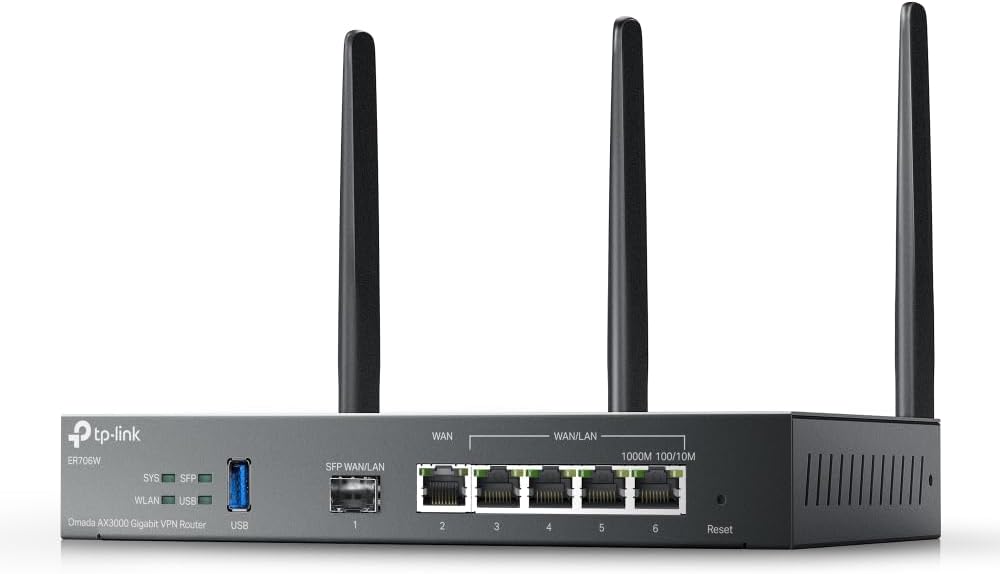
The Omada ER706W is an AX3000 business router that combines wireless connectivity with a notably flexible wired and VPN platform. Its 4.1 rating reflects a capable specification set, including a Gigabit SFP slot, five Gigabit RJ45 ports, multi-line load balancing, and support for an array of VPN protocols. It is particularly attractive to administrators who need a central gateway without a large enterprise appliance.
We may earn a commission when you buy through this link, at no additional cost to you.
The router can distribute traffic across as many as five WAN ports, helping organizations make better use of multiple broadband connections. Its SFP slot also gives network builders more flexibility than a fixed copper-only design. VPN support includes SSL, IPsec, GRE, WireGuard, PPTP, L2TP, and OpenVPN, giving remote workers and branch offices several secure connection options.
AX3000 performance is adequate for ordinary business browsing, file access, video calls, and typical cloud applications, but it is not aimed at exceptionally dense or multi-gigabit wireless environments. Omada access points can extend coverage without traditional cabling, although centralized deployment may require the appropriate Omada management approach. Buyers should also consider whether a standalone office needs the full breadth of the router's multi-WAN and VPN features.
The ER706W is a compelling value for small businesses that need VPN support, multiple WAN options, and an upgrade path into Omada-managed access points. It is a sensible gateway choice when wired control and remote connectivity are the primary requirements.
Load balancing across several WAN ports can improve utilization of multiple broadband services. Administrators can also use this flexibility to create a more dependable connection strategy for critical operations.
The wide protocol selection accommodates many common remote-access arrangements. It makes the gateway useful for connecting branch locations or authorized staff without making every employee install a separate VPN client.
We may earn a commission when you buy through this link, at no additional cost to you.
The Ruckus WirelessR750 is an indoor WiFi 6 access point explicitly designed for ultra-dense environments. It carries a 4.3 rating and belongs to a different procurement category from the standalone routers in this guide. Rather than acting as the entire network hub, it is intended to provide dependable wireless coverage where many clients compete for limited radio resources.
We may earn a commission when you buy through this link, at no additional cost to you.
Its primary advantage is deployment focus. Ruckus access points are commonly considered when predictable performance and high client density matter more than simple appliance ownership. The R750 can serve areas such as a busy hospitality property, a large meeting room, a classroom, or a workplace with frequent employee and guest traffic. Part number 901-R750-US00 helps administrators confirm the exact regional hardware.
Because this is an access point rather than a complete router, purchasing it without a suitable controller, switch, and network design can create unnecessary complexity. It also does not offer the simple all-in-one experience of the ASUS ExpertWiFi or Orbi systems. However, those limitations are acceptable when the goal is to place high-quality wireless access exactly where density requires it.
Choose the R750 as part of a professionally planned commercial wireless network, particularly when an existing Ruckus ecosystem is already in use. For a small office with modest requirements, a simpler integrated router or mesh system may offer better value.
The R750's ultra-dense focus is important in locations where many phones, laptops, and IoT clients share the same spaces. Careful placement and capacity planning become more important than simply maximizing theoretical wireless speed.
This access point is most effective when paired with appropriate enterprise networking equipment and centralized management. Organizations already invested in Ruckus infrastructure may find its integration especially natural.
We may earn a commission when you buy through this link, at no additional cost to you.
The Ruckus R670 Unleashed is a high-end indoor access point built for organizations moving beyond conventional WiFi 6 deployments. It supports the 2.4, 5, and 6 GHz bands through six spatial streams and offers a documented combined data rate of 9.34 Gbps. A listing rating is not available, so buyers should assess the specification set and organizational requirements directly.
We may earn a commission when you buy through this link, at no additional cost to you.
BeamFlex+ adaptive antenna technology is central to its value proposition. Ruckus describes it as a way to improve signal coverage, throughput, and network capacity across different client types. The built-in 5 GbE port also removes a common multi-gigabit bottleneck, making the R670 appropriate for organizations connecting access points to capable switches.
The device goes beyond WiFi by supporting BLE, Zigbee, Matter, and Thread through its converged access-point approach. It also includes WPA3, enhanced man-in-the-middle protection, and Ruckus DPSK3. Its management choices are comprehensive but require planning because on-premises appliances, virtual appliances, and auto-provisioning are sophisticated operational options.
The R670 is best suited to high-density, multi-gigabit business environments that can exploit WiFi 7 clients and modern infrastructure. The lack of a listing rating and the specialized feature set make this a more considered purchase than a general-purpose small-office router.
Multiple spatial streams across three bands allow the R670 to serve varied client populations at once. The configuration is well suited to modern offices where performance-intensive devices coexist with numerous lower-bandwidth sensors and phones.
Built-in Matter, Thread, BLE, and Zigbee support can simplify deployments that include compatible smart-building devices. The USB expansion path also offers a route for adding future wireless technologies.
We may earn a commission when you buy through this link, at no additional cost to you.
The NETGEAR Orbi 970 Series is a three-piece WiFi 7 mesh system offering up to 27 Gbps of aggregate wireless performance. Its 4.6 rating is the highest among products with an available numerical score. The router and two satellites form a dedicated-backhaul design intended to keep satellite traffic separate from client traffic, a major advantage in large homes, executive suites, and expansive offices.
We may earn a commission when you buy through this link, at no additional cost to you.
NETGEAR states that the system can cover up to 10,000 square feet and support as many as 200 connected devices, although actual results depend on construction, layout, interference, and placement. Wired connectivity is also unusually robust: a 10 Gbps internet port and combined 10 Gbps and 2.5 Gbps LAN ports support high-speed NAS storage, workstations, and modern office equipment.
This is primarily a premium mesh system, not a feature-heavy enterprise controller. Businesses that require multiple isolated SSIDs, intricate VPN policies, or detailed client policies may find a business router or managed access-point platform more precise. The three-unit bundle may also be unnecessary for a small office. Even so, the dedicated backhaul and multi-gigabit wired design offer an attractive way to cover a substantial area without laying cable between access points.
The Orbi 970 Series is an excellent choice for organizations prioritizing broad, fast coverage with uncomplicated administration. It suits modern offices and large commercial properties where WiFi 7 clients and multi-gigabit internet plans are already relevant.
A dedicated lane for communication between mesh units helps reduce the contention that can occur when backhaul shares ordinary client bands. This is especially useful when many wireless devices operate throughout the property.
10 Gbps and 2.5 Gbps Ethernet options support demanding local traffic and high-capacity internet connections. They are useful for network storage, high-resolution media workflows, and other devices that can benefit from faster local links.
We may earn a commission when you buy through this link, at no additional cost to you.
The Omada EAP650 is a dual-band WiFi 6 ceiling access point with a 4.5 rating and an unusually flexible management proposition. It supports free Omada Essentials cloud management without requiring a separate hardware controller or locally installed management software. Administrators can begin by scanning the device serial number, deploying it, and managing the network through the Omada app.
We may earn a commission when you buy through this link, at no additional cost to you.
Wireless performance reaches a documented 2976 Mbps using technologies including 1024-QAM, HE60, and long OFDM symbols. More importantly for business operations, the EAP650 integrates with the broader Omada SDN ecosystem. Mesh WiFi, seamless roaming, WPA3, band steering, load balancing, airtime fairness, and beamforming are all supported, with some mesh and roaming functions requiring an Omada controller.
Installation flexibility is another strength. The access point can draw power from 802.3at PoE+, 48V passive PoE, or its included 12V DC adapter. This makes it possible to place coverage near difficult locations without immediately adding a powered outlet, although a suitable switch or injector remains necessary. Its slim enclosure also fits neatly into offices, hotels, classrooms, and cafés.
The EAP650 is an excellent entry point for a managed commercial wireless network. It is not a standalone router, so businesses need an existing wired backbone and internet gateway. In return, they gain centralized control and a long warranty for a comparatively accessible deployment.
Omada Essentials gives smaller organizations a path to centralized administration without buying a dedicated controller. Sites can be monitored and adjusted through the app, which is especially helpful for teams with limited on-site IT support.
Support for PoE+, passive PoE, and the supplied DC adapter means administrators can choose the most convenient power source at each location. Proper switch and cabling standards still need to match the intended installation.
We may earn a commission when you buy through this link, at no additional cost to you.
The Ubiquiti U6+ is a compact dual-band WiFi 6 access point with a 4.6 rating and a documented 3 Gbit/s wireless transmission rate. It is designed to create a business network in a straightforward way, supporting modern 802.11ax clients while retaining compatibility with older IEEE 802.11 a, b, g, n, and ac standards.
We may earn a commission when you buy through this link, at no additional cost to you.
Its Gigabit Ethernet port provides a fast wired backbone for wireless traffic, while the PoE+ port delivers data and up to 25.5W of power over one cable. This is a practical installation method in locations where a nearby power outlet would be inconvenient. The wall-mountable form factor is suitable for offices, hospitality areas, and other business interiors where an unobtrusive access point is desirable.
Because the U6+ is an access point rather than a router, it requires an existing network gateway, wired connection, and appropriate management environment. The supplied product details emphasize wireless and physical capabilities without documenting broader site-to-site or controller features, so buyers should confirm how it will fit their existing infrastructure. Those considerations matter more than minor differences in theoretical throughput.
The U6+ is a strong choice for a small or medium business that already has a structured network and wants discreet, reliable WiFi 6 coverage. Its strong rating, compact installation, and single-cable power option make it easier to recommend than many specialized enterprise access points.
PoE+ combines network data and power, allowing administrators to deploy the access point without a separate local power connection. This can simplify installation in offices, conference areas, and customer-facing spaces.
The small wall-mountable unit is designed to blend into modern commercial interiors. A less obtrusive access point can be particularly useful in hospitality, retail, and client-facing environments.
We may earn a commission when you buy through this link, at no additional cost to you.
The TP-Link Archer BE400 is a dual-band WiFi 7 router with a 4.3 rating and a combined maximum throughput of 6452 Mbps across its 5 GHz and 2.4 GHz bands. It supports Multi-Link Operation, Multi-RUs, and 4K-QAM, giving compatible modern clients access to improved throughput, lower latency, and more resilient connections when suitable devices and network conditions are present.
We may earn a commission when you buy through this link, at no additional cost to you.
Its two 2.5 Gbps ports and three 1 Gbps LAN ports provide a more business-relevant wired profile than many compact WiFi 7 routers. A multi-gig modem can use the 2.5 Gbps WAN/LAN connection, while the additional LAN port supports local equipment without forcing every device onto gigabit Ethernet. The six antennas, beamforming, and documented coverage target of up to 2,400 square feet suit modest offices and busy homes.
The BE400 is a small-business-friendly general router, but it is not a full software-defined business platform. It does not advertise the same depth of centralized policy control as Omada, and its role is centered on the primary site rather than standardized management across many locations. It can expand with an EasyMesh-compatible router or range extender, but it is explicitly not compatible with Deco mesh systems.
Choose the BE400 for a compact, modern business location that wants WiFi 7, fast wired connections, and simple app management. A separate modem or gateway is required, and a dedicated access-point system may be more appropriate for a large office with complex coverage requirements.
Multi-Link Operation can use multiple frequency links simultaneously, while 4K-QAM increases data density on supported clients. Older WiFi 6 and WiFi 5 devices remain compatible, although they cannot realize the full benefits of the newest standard.
The 2.5 Gbps networking options offer a useful middle ground between conventional gigabit and premium 10-gigabit deployments. They are well suited to modern modems, high-performance laptops, and network storage.
We may earn a commission when you buy through this link, at no additional cost to you.
The NETGEAR Nighthawk WiFi 7 is a tri-band router offering up to 9.3 Gbps of aggregate wireless performance and a 4.3 rating. Its dedicated high-speed third band is intended to keep demanding clients on a separate path from lower-bandwidth 2.4 GHz equipment, making it a practical fit for offices where phones, laptops, televisions, and smart-home devices all connect at once.
We may earn a commission when you buy through this link, at no additional cost to you.
NETGEAR lists coverage for up to 2,500 square feet and as many as 100 devices, while acknowledging that walls, floors, and interference affect actual results. The router includes a 2.5 Gbps WAN port, two 2.5 Gbps LAN ports, and two 1 Gbps Ethernet LAN ports. That wired mix supports multi-gig internet plans and modern local equipment without requiring a premium 10-gigabit design.
The Nighthawk app provides guided setup, speed testing, device pausing, guest-network controls, and remote management. Compatibility with most cable, fiber, DSL, and satellite providers simplifies internet setup, although some gateway combinations may need bridge mode. It is a versatile single-site router, but very large or multi-story properties may need an Orbi mesh system for better reach.
Choose the Nighthawk for a connected workplace seeking a balanced mix of WiFi 7 speed, multi-gigabit wired access, and straightforward administration. It provides more modern capacity than typical business routers without requiring the scale or complexity of a complete enterprise access-point system.
The dedicated third band gives compatible high-performance devices a separate route through the network. This can help maintain responsiveness when numerous ordinary IoT and mobile clients are also active.
Two 2.5 Gbps LAN ports support high-speed workstations and storage, while 1 Gbps ports cover common office equipment. The mix of interfaces offers more flexibility than a basic gigabit-only router.
We may earn a commission when you buy through this link, at no additional cost to you.
The ASUS RT-BE88U is a high-performance WiFi 7 router built around 10-gigabit networking. It has a 4.3 rating and supports up to 7200 Mbps of wireless throughput through Multi-Link Operation and 4096-QAM. Its most distinctive feature is the combination of a 10G SFP+ port and a 10G WAN/LAN port, which together can expand wired capacity to as much as 34G.
We may earn a commission when you buy through this link, at no additional cost to you.
A quad-core 2.6 GHz 64-bit processor is intended to handle demanding WiFi 7, multi-gigabit, and network application workloads. ASUS includes commercial-grade AiProtection Pro powered by Trend Micro, one-tap security scanning, comprehensive VPN support, site-to-site VPN, parental controls, and Guest Network Pro with support for up to five SSIDs. These are meaningful advantages for administrators who need more granular network separation.
The router also supports flexible WAN configuration and a USB connection for 4G LTE or 5G mobile tethering, creating a possible continuity option when the primary service is interrupted. The device can be combined with AiMesh for wider coverage, but buyers should account for the added complexity of high-speed cabling, compatible switches, and appropriate client hardware.
This is a strong choice for a modern business with multi-gigabit connectivity, demanding users, or a need for advanced ASUS network services. Smaller offices may receive more value from the EBR63 or another simpler gateway, while this model is intended to support demanding, performance-conscious deployments.
Fast SFP+ and RJ45 interfaces prevent high-capacity local links from becoming an avoidable bottleneck. They are particularly useful when connecting a business to multi-gigabit equipment, fast storage, or advanced switching infrastructure.
AiProtection Pro, VPN options, site-to-site connectivity, parental controls, and multiple SSIDs cover several common business requirements. Consolidating these features can reduce the number of separate services an administrator must coordinate.
We may earn a commission when you buy through this link, at no additional cost to you.
Choosing a commercial wireless router starts with the operating environment, not the headline speed number. The most suitable system balances client density, wired capacity, management needs, security policies, and the physical realities of the building.
WiFi 6 and WiFi 7 access points can serve older and newer clients, but newer standards provide the most benefit when users have compatible phones, laptops, tablets, and peripherals. AX3000 routers are still practical for ordinary business traffic, while tri-band WiFi 7 systems are better aligned with dense device populations and high-throughput applications. Advertised aggregate rates are laboratory limits, so compare real-world client capabilities rather than assuming every device receives the stated maximum.
Choose a newer standard for future longevity, but prioritize client compatibility and coverage. A properly placed WiFi 6 access point can outperform a poorly deployed WiFi 7 system.
A business with scattered sensors, employee laptops, customer phones, and occasional video calls needs more than a generic coverage estimate. Dense environments may require access points designed to manage contention, separate traffic, and maintain consistent connections. A single high-speed router can work well in a modest office, while a hotel, school, warehouse, or conference venue may need several coordinated access points.
Estimate the number and behavior of connected clients, not merely the floor area. Then allow for growth, visiting guests, and heavier applications introduced later.
Gigabit Ethernet is sufficient for many conventional offices, but 2.5, 5, and 10-gigabit ports support modern high-speed internet plans, local file transfers, and demanding network storage. Businesses should also account for the switch capacity behind any access point. A fast access point connected to an older switch can still create a bottleneck, and SFP uplink support may be valuable for longer or more flexible installations.
Match wired ports to the internet service and local traffic. Do not pay for multi-gigabit hardware that cannot be used by the modem, switch, servers, or endpoints.
A single-location office may be well served by an app with guided setup and remote controls. Organizations with multiple sites or numerous access points benefit from centralized dashboards, configuration templates, role-based access, and the ability to monitor many devices from one interface. Enterprise controller options offer more control but also demand greater operational expertise. Cloud-managed access points can reduce hardware requirements for smaller teams.
Select a management approach that the person responsible for the network can actually maintain. Simple is not inferior when it reliably meets the business's needs.
Commercial networks should isolate employees, guests, sensitive systems, cameras, and IoT devices whenever practical. Look for WPA3, VPN support, firewall capabilities, secure remote administration, automatic updates, and options for multiple SSIDs with VLAN or traffic policies. Guest portals improve the onboarding experience, while dynamic client security features can make temporary access easier to manage.
Separate networks are one of the most practical ways to reduce exposure and simplify troubleshooting. Review all wireless security features together rather than focusing only on the generation of encryption.
Remote workers and branch offices can require secure site-to-site or client access, so VPN protocol support may be a deciding factor. Multi-WAN load balancing can improve utilization of multiple broadband services, and backup cellular or hotspot connections can improve continuity. These capabilities matter more when a network interruption would stop customer service, point-of-sale activity, or internal work.
Define which failures the network must survive before choosing a router. A backup WAN and a business VPN gateway provide different forms of resilience and should be evaluated separately.
Coverage claims are useful only as general guidance because walls, floors, construction materials, interference, and access-point placement all influence results. Mesh systems can extend a home or office without new cabling, while ceiling access points generally provide cleaner and more scalable commercial coverage. Powering options also affect placement, particularly where outlets are unavailable or PoE switches are already installed.
Survey the site before buying, identify dead zones, and account for future walls or furniture changes. A physical plan is often more valuable than a small increase in advertised wireless speed.
The right system includes not only acquisition but also installation, controller licensing, subscriptions, support, and replacement planning. Some products include cloud management without extra controller hardware, while others offer hardware, software, virtual, or cloud-based management choices. Security subscriptions, VPN services, and support terms may also vary by model. Business operators should review the complete ownership model rather than focusing on the router alone.
Include management and security costs in the purchasing decision. The least expensive unit is not necessarily the most economical solution once the required services are considered.
Begin with a site survey and a written network plan. Record the location of the internet gateway, existing switches, power locations, high-use areas, and physical obstructions. Decide which devices belong on staff, guest, management, and IoT networks before configuring SSIDs. This prevents accidental overlap and gives every device a clear role from the first day of operation.
Install the router or access point according to the manufacturer's guidance. For a mesh system, position satellites to overlap coverage without placing them in dead zones or beside unnecessary electronics. For professional access points, connect approved cabling and PoE, mount the unit where clients can receive a strong signal, and keep it away from heat sources, metal enclosures, and direct attention. Firmware should be updated promptly after installation.
After deployment, test coverage in real locations, check wired speeds, verify that clients receive the intended network, and confirm that guest or IoT devices cannot access protected resources. Keep administrator credentials unique, maintain firmware, record configuration changes, and periodically review connected clients and security alerts. A commercial router benefits from regular attention just as it does from careful initial setup.
A commercial router usually combines internet routing, wireless service, firewall controls, VPN features, and management in one appliance. A business access point primarily provides wireless connectivity and must connect to a separate router, switch, and management platform. Businesses with simple needs may prefer an integrated router, while larger or more specialized deployments often benefit from multiple managed access points.
Not always. A well-placed WiFi 6 business router may deliver satisfactory performance when the internet connection, client count, and applications are moderate. WiFi 7 becomes more attractive when supporting many recent devices, high-throughput applications, multi-gigabit service, or a network expected to remain current for several years.
The correct number depends on client density, building construction, and coverage requirements rather than square footage alone. A compact office may need one capable router, while a large office often benefits from several coordinated access points. A professional survey or heat map can reveal whether additional units would improve coverage or capacity.
No. Access points provide wireless access but generally require a router or gateway for internet routing, DHCP, firewall functions, and network-wide policy enforcement. They also need a wired connection and compatible management platform or controller.
Yes, separate networks are widely recommended because they improve security, reduce accidental access, and simplify troubleshooting. Guest networks can be isolated from internal resources, while employees and IoT devices can be assigned according to role. The strongest implementations also use VLANs or equivalent traffic policies where the equipment supports them.
Models with site-to-site VPN can connect authorized locations over an encrypted tunnel, while multi-WAN gateways can combine broadband services. Both ends of the connection must have compatible addressing and routing policies. For larger distributed networks, centrally managed access points and cloud-based administration may be easier to maintain.
At minimum, the router should match the available internet service and support the local devices that move large files. Gigabit Ethernet handles many office needs, while 2.5, 5, and 10-gigabit interfaces make sense for fast internet plans, NAS systems, and high-end workstations. Switches and endpoint capabilities must also support the selected speed.
Use WPA3 or the strongest compatible security option, isolate sensitive and guest traffic, change default credentials, and keep firmware current. Administrators should also review connected clients, define access rules, and verify that remote management is protected. Security is an ongoing process rather than a one-time setup task.
The ASUS ExpertWiFi EBR63 is the most balanced all-in-one choice for a small or medium business, especially when separate SSIDs, branded guest access, and simple mobile management are important. The Omada EAP650 stands out as an affordable managed access point for organizations that already have a wired network, while the NETGEAR Orbi 970 Series leads the premium selections for broad, fast, uncomplicated WiFi 7 mesh coverage.
The remaining products serve more specialized requirements. The ER706W is a compelling VPN and multi-WAN gateway, the Ruckus R750 and R670 target high-density environments, the Ubiquiti U6+ offers compact PoE+ access, and the TP-Link BE400 and NETGEAR Nighthawk provide modern WiFi 7 in simpler standalone designs. The ASUS RT-BE88U is the most compelling when 10-gigabit wired performance and advanced security features are central priorities.
Before purchasing, compare the management model, client compatibility, physical coverage, and wired requirements with the exact way your business operates. Retail prices, ratings, product bundles, and feature availability can change, so verify the current listing and manufacturer documentation. The best commercial wireless router is ultimately the one that maintains reliable service while remaining manageable for the team responsible for it.