
VIVO Black Pole Mount Monitor Arm
4.6Editor score
Broad pole diameter compatibility
17-to-32-inch display support
Rotating pole clamp
A monitor arm pole extension mount can add reach, height, and flexibility to a workstation that needs a more useful display position. The right model should match your screen size, VESA pattern, desk construction, and preferred movement while keeping cables organized and the installation straightforward.
This guide compares ten monitor arm pole extension mount options based on screen support, extension range, adjustment, mounting methods, and included hardware. It covers complete arm-and-pole systems, extension arms that require a separate pole, and tall poles intended to upgrade an existing monitor arm.
Each review explains the product's strongest benefits, practical limitations, and ideal buyer, helping you identify the right setup for a compact desk, sitting-and-standing workspace, or large display. Product configurations and prices can change, so verify current specifications and availability before purchasing.
4.6Editor score

5.0Editor score

5.0Editor score
As an Amazon Associate we earn from qualifying purchases.
The table below compares the ten recommended products by display range, reach, mounting approach, and adjustment capability, making it easier to distinguish complete systems from extension arms and standalone poles.


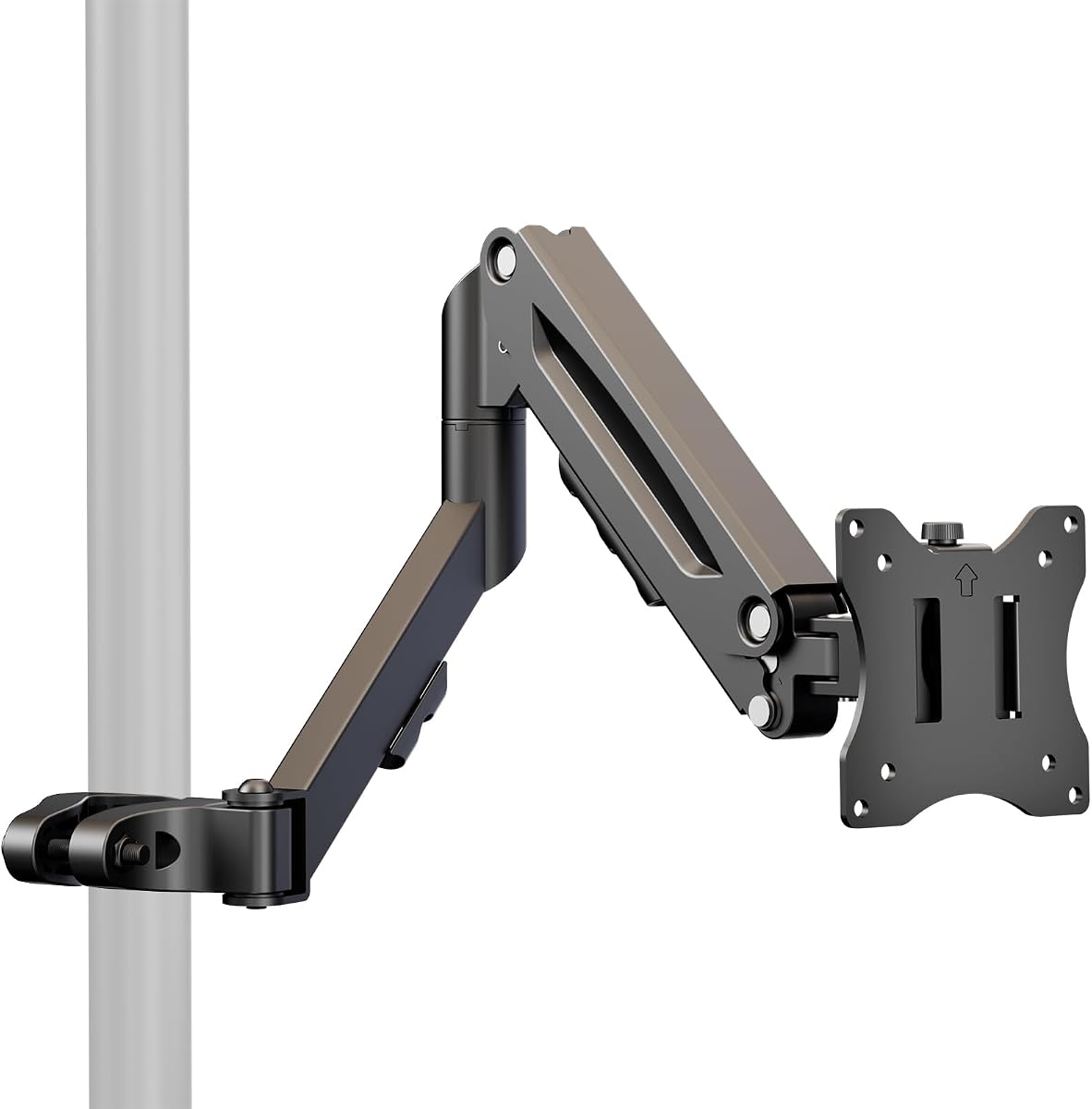


The VIVO Black Long Pole Mount Monitor Arm is a versatile extension arm for users who want substantial reach without moving their monitor stand. It carries a 5.0 rating and is designed for 17-inch to 32-inch screens weighing as much as 22 pounds. Its steel construction, 26.8-inch total extension, and broad pole compatibility make it the most versatile all-around option in this guide.
We may earn a commission when you buy through this link, at no additional cost to you.
The arm accepts poles measuring 1.1 to 2.0 inches in diameter and works with VESA 75x75mm and 100x100mm mounting patterns. Its mounting bracket offers plus or minus 30 degrees of tilt, plus or minus 90 degrees of swivel, and full 180-degree rotation. The pole clamp itself can rotate around the pole, which is particularly useful when repositioning a shared screen for collaboration or presentation.
Cable management clips keep signal and power cords aligned with the arm instead of allowing them to hang behind the display. A removable VESA plate simplifies screen attachment, and the stated inclusion of hardware and instructions reduces uncertainty during assembly. The main drawback is that the pole is not included, so this product makes the most sense if you already own a compatible pole or plan to purchase one separately.
This is the strongest general recommendation for users who need a long, articulate arm for a conventional office display. It suits desks where a standard monitor arm cannot place the screen far enough back or to the side. Buyers should confirm both the pole diameter and display weight before ordering, while those wanting a larger VESA pattern should look toward the large-screen VIVO model later in the guide.
The 26.8-inch extension creates useful distance from the desk, while tilt, swivel, and rotation allow the display to follow your preferred working position. These adjustments also make the arm practical for occasional screen sharing or viewing from different sides of a workstation.
A removable VESA plate separates the mounting process into manageable stages. Once the arm is secured to a compatible pole, attaching a standard 75x75mm or 100x100mm display is comparatively straightforward.
We may earn a commission when you buy through this link, at no additional cost to you.
The MOUNT PRO Single Long Monitor Arm is designed to create more usable desk space while raising a display toward eye level. Its 4.5 rating, extended 27.76-inch arm, and ability to position a screen up to 28.5 inches above the desktop make it especially appealing for deep workspaces and taller users. It supports 13-inch to 32-inch flat or moderately curved LCD and LED screens.
We may earn a commission when you buy through this link, at no additional cost to you.
Adjustment includes plus or minus 90-degree swivel, plus 85-degree and negative 45-degree tilt, and 360-degree rotation for portrait or landscape positioning. The taller column provides a broader vertical working range than many conventional arms. Integrated cable management helps preserve a clean appearance, while the stated 20,000 motion-cycle testing supports confidence in the moving joints.
The product supports either clamp or grommet installation. Its clamp fits desktops from 0.39 to 3.15 inches thick, while grommet mounting works with desks from 0.39 to 1.97 inches thick. Standard 75x75mm and 100x100mm VESA patterns are supported, along with screens weighing 4.4 to 19.8 pounds. However, screens with 1000R, 1500R, or 1800R curvature are explicitly excluded.
This monitor arm is best for users who want dramatic reach and height without a separate vertical pole system. It is a strong alternative when the screen is meant to sit well above a deep desk. Confirm that your monitor falls within the size, weight, curvature, and VESA limits before installation, especially if you own an aggressively curved ultrawide display.
Moving the display onto a long elevated arm frees the area directly beneath the screen for a laptop, keyboard, mouse, or writing materials. That makes the product practical for creative, technical, and multi-device desks where surface space is valuable.
A maximum monitor height of 28.5 inches can bring the display closer to a comfortable eye level. The extra column height is especially useful when the user is taller, the desk is deep, or the existing monitor stand lacks sufficient lift.
We may earn a commission when you buy through this link, at no additional cost to you.
The VIVO Black Pole Mount Monitor Arm, model MOUNT-POLE01A, provides a straightforward way to add articulation to an existing pole. It has a 4.6 rating and supports 17-inch to 32-inch monitors and televisions with VESA 75x75mm or 100x100mm patterns. Its weight capacity is 17.6 pounds, which covers many mainstream office and gaming displays.
We may earn a commission when you buy through this link, at no additional cost to you.
A major strength is its compatibility with poles measuring 1.1 to 2.4 inches in diameter, the broadest listed pole range in this roundup. The bracket provides plus or minus 30-degree tilt, 180-degree swivel, and 360-degree rotation. Because the pole clamp can turn completely around the pole, the display can move from one side of the work surface to another without requiring a separate repositioning system.
Cable clips route cords along the arm, and the removable VESA plate simplifies attachment to the display. Mounting hardware and instructions are included. As with the other VIVO pole-mounted extension arms, the pole itself is not included, so the complete setup may require an additional compatible component.
This is the best budget option for buyers who already own a pole and only need a capable extension arm. Its wide pole-diameter range also makes it more forgiving when the supporting pole's dimensions are uncertain. The lower 17.6-pound limit and absence of a stated extension figure are the principal points to compare against the longer VIVO model.
The ability to work with poles from 1.1 to 2.4 inches in diameter reduces the chance of purchasing an incompatible support. That broader range is valuable when assembling the mount from separately sourced components.
The rotating pole clamp allows a screen to swing rapidly between users or toward a meeting area. This makes the arm useful in shared offices, collaborative desks, and occasional presentation setups.
We may earn a commission when you buy through this link, at no additional cost to you.
The 31.6-inch Steel Extra Tall Pole is a support upgrade rather than a complete monitor arm. With a 4.2 rating, it is intended for users who already own an arm and want to raise it higher. The two-section steel pole reaches approximately 31.6 inches, has a 1.4-inch diameter, and carries a stated load of approximately 44 pounds.
We may earn a commission when you buy through this link, at no additional cost to you.
Both clamp and grommet fixation are available. The clamp accommodates desk thicknesses from 0.4 to 3.3 inches, while the grommet option supports approximately 0.4 to 1.6 inches. The base choice gives users flexibility between a drill-free edge installation and a more integrated through-desk arrangement. Cable-management components help route cords neatly along the upright structure.
All necessary installation components and manuals are included for the pole itself. The critical limitation is that the product is pole-only. It cannot be used as a stand by itself and must be combined with a compatible extension arm, clamp, and display plate. The unusually high stated load should also be considered in relation to the stability of the desk and base.
This pole is best for a user who wants to retrofit an existing monitor arm for a higher position. It works especially well when a conventional arm cannot place a display above an obstruction or when a deeper desk requires a taller support column. Confirm arm compatibility, the base arrangement, and your desktop thickness before buying.
Because the product supplies height rather than screen articulation, it can improve a setup that already has a suitable arm. A taller pole may solve screen placement issues without requiring the user to replace every component of the workstation.
The clamp base is convenient when drilling is undesirable, while the grommet base can produce a cleaner permanent installation. Compare both methods against your desk thickness and preferred installation style.
We may earn a commission when you buy through this link, at no additional cost to you.
The SUPTEK Single Monitor Arm is a three-tier extension arm for a 1.375-inch pole. It carries a 5.0 rating, supports displays up to 32 inches and 22 pounds, and can reach 27.56 inches from the pole to the center of the panel. Despite the title referring to 13- to 27-inch screens, the specification section states support for one monitor up to 32 inches.
We may earn a commission when you buy through this link, at no additional cost to you.
Its three arm sections measure 7.48, 8.07, and 8.07 inches, giving users multiple ways to set the screen's distance. Telescopic adjustment, plus or minus 90-degree swivel, plus or minus 90-degree tilt, and 360-degree plate rotation allow the display to move between landscape and portrait orientations. These movements are intended to support a more comfortable viewing position.
Detachable cable clips are included to organize power and AV cables. The package also contains a mounting hardware kit and VESA plate, covering the main components needed once a compatible pole and desk base are in place. Compatibility extends to VESA 75x75mm and 100x100mm patterns.
This arm is a good choice for users who want more granular positioning than a basic two-piece extension. Its staged construction can place the monitor farther back, closer to the side, or directly over the desk. The fixed 1.375-inch pole requirement is the main constraint, so measure the existing pole before purchasing or plan to acquire a matching support.
Each articulated section can contribute to the final reach, allowing the display to be pulled close, extended outward, or positioned over the work surface. The arrangement offers more setup options than a simple straight extension.
Full plate rotation makes portrait mode practical for documents, code, or narrow applications. Paired with broad swivel and tilt ranges, it allows the screen to respond to different seating positions and tasks.
We may earn a commission when you buy through this link, at no additional cost to you.
The Steel Extra Tall 32 Inch 2-Section Monitor Stand Pole is built for users who want a high-capacity vertical support for a large or heavy display. It has a 4.5 rating and uses 35mm, or 1.38-inch, steel tubing with a powder-coated finish. The stated capacity reaches 88 pounds, making it one of the most robust supports in this comparison.
We may earn a commission when you buy through this link, at no additional cost to you.
The pole can serve as an add-on to an existing monitor arm or as the central support in a compatible workstation configuration. Its 32-inch height creates substantial vertical space, while the dual-joint design is intended to improve stability. The matte black finish is designed to resist fingerprints and blend with modern office or gaming equipment.
Users can select a C-clamp for desks between 0.39 and 3.35 inches thick or a grommet base for desks between 0.39 and 1.97 inches thick. The stated compatibility with a broad range of desks is useful, but the base still needs to fit both the desktop dimensions and the intended display configuration.
This product is best for combining a heavy-duty monitor with an existing compatible arm. It makes sense when a standard pole cannot safely support the load or cannot reach the required height. It is not a complete monitor arm, and the display, arm, and any other required components must be accounted for separately.
The 88-pound stated load gives the pole substantial headroom for large displays. That margin is useful for ultrawide models, although the combined weight of the screen, arm, and adapters still matters.
At 32 inches, the pole can lift a compatible arm well above standard monitor-stand height. This may improve viewing comfort and help clear objects placed at the rear of the desk.
We may earn a commission when you buy through this link, at no additional cost to you.
The Height Adjustable Pole Mount Monitor Arm adds spring-assisted vertical movement to a pole-mounted display. It has a 4.4 rating and fits 17-inch to 32-inch screens with 75x75mm or 100x100mm VESA patterns. Displays may weigh up to 19.8 pounds, and the arm extends 19.8 inches from the pole.
We may earn a commission when you buy through this link, at no additional cost to you.
Its internal mechanical spring provides an adjustable height range of approximately 5.98 to 17 inches. This makes it easier to raise or lower a monitor without operating a stiff conventional height collar. The bracket also supports plus or minus 55-degree tilt, plus or minus 90-degree swivel, and 180-degree screen rotation.
The clamp attaches directly to a pole, allowing the arm to be incorporated into a larger pole system. Cable management is included to keep cords aligned with the assembly. The resulting design is particularly useful when a fixed-height arm would make it difficult to alternate between sitting and standing positions.
This product is best for users who prioritize smooth height adjustment over maximum reach. Its 19.8-inch extension is shorter than several leading models, so it may suit a desk where the screen needs to move nearer to the user rather than farther away. Confirm pole compatibility and the available adjustment range before ordering.
The internal spring assists the vertical adjustment process, which can be helpful in a frequently changing workstation. It provides a more convenient alternative to relying entirely on friction from a standard pole collar.
Wide tilt and swivel ranges let the screen follow your posture or shift toward another viewer. Full rotation also supports portrait use for tasks that benefit from a taller display area.
We may earn a commission when you buy through this link, at no additional cost to you.
The VIVO Extra Tall Single Monitor Desk Mount, model STAND-V011, is built around a 39-inch center pole that can move a display between sitting and standing positions. It has a 4.5 rating and supports screens from 13 to 32 inches as well as ultrawide displays up to 38 inches. The supported weight is up to 22 pounds.
We may earn a commission when you buy through this link, at no additional cost to you.
Its arm offers plus or minus 90-degree tilt, 360-degree swivel, and 360-degree rotation, allowing the display to move into portrait or landscape orientation. Height adjustment along the center pole adds another layer of positioning. Cable clips run along the arm and pole to organize AV and power cords, which is important in a tall moving assembly.
The standard heavy-duty C-clamp attaches to surfaces up to 4 inches thick without drilling. An optional grommet mount is available for users who prefer an integrated installation. The detachable VESA bracket, included hardware, and step-by-step manual help make assembly approachable.
This is an excellent option for a sit-stand desk or a workspace that needs a very wide range of screen heights. It also accommodates wider displays than many standard arms. Its large vertical structure may feel excessive for a compact desk, so consider desk depth, base clearance, and whether the full height range will actually be used.
The 39-inch pole gives the screen substantially more vertical travel than a conventional desk mount. That range allows the display to remain useful as the user changes posture or raises a height-adjustable desk.
Support for ultrawide monitors up to 38 inches extends the product beyond the normal compact-screen range. Users should still verify the display's weight and VESA pattern before installation.
We may earn a commission when you buy through this link, at no additional cost to you.
The VIVO Black Long Pole Mount Monitor Arm is the premium large-display choice in this guide. It carries a 5.0 rating and supports 23-inch to 43-inch monitors and televisions weighing up to 22 pounds. Its VESA compatibility extends to 200x200mm, allowing it to accommodate mounting patterns that smaller standard arms cannot handle.
We may earn a commission when you buy through this link, at no additional cost to you.
The arm provides 27 inches of total extension and fits poles measuring 1.1 to 2.3 inches in diameter. Adjustment includes plus or minus 30-degree tilt, plus or minus 90-degree swivel, and plus or minus 180-degree rotation. As with the other long VIVO pole arms, the pole clamp can rotate completely around the pole for quick screen repositioning.
Cable clips route cords along the arm, while a removable VESA plate supports easier display installation. All mounting hardware and instructions are included for assembling the extension arm. The pole is not included, and the minimum 23-inch screen range means this is not the right option for a compact notebook display.
This model is best for a large monitor, television, or ultrawide display that needs both greater VESA compatibility and substantial reach. It is particularly relevant to users who have a suitable pole and want to avoid replacing a large screen with a smaller VESA-compatible model. Measure the display, confirm the VESA pattern, and verify the pole diameter first.
Support up to 200x200mm separates this model from standard 75x75mm and 100x100mm arms. It gives large displays more freedom when selecting a mount and reduces the need for a separate large-screen adapter.
A 27-inch extension and broad articulation range make the display easier to pull forward, angle to either side, or rotate for another viewer. These features are useful in shared workspaces and presentation areas.
We may earn a commission when you buy through this link, at no additional cost to you.
The HUANUO Single Monitor Arm with 39-inch Extra-Tall Pole is a complete system for users who want a high display position and extensive articulation. It has a 4.6 rating and supports 13- to 32-inch screens, ultrawide displays up to 38 inches, and weights up to 22 pounds. Detachable mounting plates accommodate 75x75mm and 100x100mm VESA patterns.
We may earn a commission when you buy through this link, at no additional cost to you.
The 39-inch center pole is designed to support a transition between sitting and standing. The arm provides 180-degree tilt, 180-degree swivel, and 360-degree rotation, giving the display a broad range of working angles and allowing it to change between portrait and landscape orientations. Integrated cable management keeps the power cord organized along the tall support.
Both a C-clamp and grommet base are included, allowing installation on different desk configurations. The C-clamp handles desktops up to 3.93 inches thick, while the grommet option supports desks up to 2.75 inches thick. Assembly hardware and instructions are also included.
This is a strong all-in-one choice for sit-stand desks, large monitors, and users who prefer not to assemble a custom pole system from separate pieces. Its 39-inch height and deep positioning may be excessive for a small workstation, so consider available desk depth and whether you need a full standing-height range.
Unlike a pole-only product, this system includes the arm, center pole, mounting plates, and base options. It reduces the need to source and match several separate components.
The included C-clamp enables a drill-free installation at a desk edge, while the grommet base offers an alternative integrated arrangement. Choose the method that matches your desktop and installation preferences.
We may earn a commission when you buy through this link, at no additional cost to you.
The right monitor arm pole extension mount depends on whether you need a complete stand, an extension arm for an existing pole, or a tall support column. Screen dimensions, VESA patterns, load limits, desk construction, and preferred movement should guide your decision.
Some products combine a pole, base, extension arm, and VESA plate, while others provide only one part of that system. The VIVO and HUANUO 39-inch products are complete tall-mount solutions, whereas the VIVO MOUNT-POLE01A, the VIVO long pole arms, and the SUPTEK arm require a compatible pole. The 31.6- and 32-inch steel products are also pole-only and need a separate arm. Choosing the wrong configuration can lead to an incomplete setup or unnecessary duplicate purchases.
Start with the manufacturer's stated screen range, but also check the weight limit. Most products here support 22 pounds, while the MOUNT PRO and gas-spring model reach 19.8 pounds and the smaller VIVO pole arm reaches 17.6 pounds. Larger products may be intended to support big displays or create extra headroom for a combined arm-and-screen load. A large diagonal size does not automatically mean a heavy monitor, so confirm the actual weight and compare it with the specification.
Most standard monitors use 75x75mm or 100x100mm mounting holes. The VIVO large-screen arm expands compatibility to 200x200mm, which is valuable for televisions and larger professional displays. Verify the pattern printed on the back of your screen and compare it with the arm's plate before buying. A display that physically fits within the stated size range may still require an adapter that the product does not include.
Extension arms that clamp around an existing pole must match its diameter. Listed requirements range from a fixed 1.375 inch to broader ranges of 1.1 to 2.4 inches. Measure both the outside diameter and any irregular shape of the pole, as stated compatibility figures generally assume a standard round support. A clamp that is too loose may move under load, while one that is too small may not open far enough to fit.
Longer extension can place the screen farther from the user, closer to the rear edge, or farther to the side. This can recover desk space, but excessive reach may make the display feel disconnected from the keyboard and mouse. The leading products offer roughly 27 to 27.76 inches of reach, while the gas-spring model lists 19.8 inches. Match the arm to the physical depth of the desk and the distance at which you naturally view the screen.
A tall pole is especially valuable for sit-stand desks, higher seating positions, and displays that need to clear desk objects. Complete 39-inch systems offer the greatest vertical range, while the gas-spring arm provides approximately 5.98 to 17 inches of movement. A fixed pole may be sufficient for a seated workstation, but it is less adaptable if you later change desks, chair height, or working posture.
Tilt, swivel, rotation, and extension determine how easily the display can follow your position. Swivel is useful for sharing a screen, tilt reduces glare, and rotation enables portrait mode. The VIVO long arms provide up to 180 degrees of swivel and full rotation, while the complete VIVO and HUANUO systems also offer 360-degree swivel. More adjustment is beneficial, although a stable desk and correct installation remain essential.
C-clamp installation is convenient when drilling is unwanted, while a grommet base can look tidier and may suit a permanent workstation. Check maximum desktop thickness carefully because limits differ by product and base. Integrated clips or channels help keep power and video cables aligned with the moving arm, reducing snagging and visual clutter. In a tall or highly adjustable setup, cable control is not merely cosmetic; it keeps the workspace safer and easier to use.
Begin by assembling the base and upright pole on a stable surface. If using a C-clamp, position it on a thick, accessible edge and tighten the fixing screw evenly. For grommet mounting, confirm the hole position and desk thickness before removing or drilling anything. Secure the pole according to the manual before attaching an extension arm or display.
Install the appropriate VESA plate on the back of the monitor, using the supplied bolts and checking that the screen rests correctly. Connect power, video, and USB cables while the display is lowered, then route the cords through the included clips. Raise and articulate the arm slowly, watching for cable tension, contact with desk objects, and interference with walls or other equipment.
For routine care, wipe the metal surfaces and moving joints with a soft, dry or lightly dampened cloth, and avoid abrasive cleaners. Periodically inspect the bolts, pole clamp, joints, and desk base for loosening, especially after moving the display. Do not exceed the stated weight limit, and avoid hanging objects from the arm. Adjust the cable clips whenever the screen's position changes to prevent stretching or pinching.
It adds reach, height, or positioning flexibility to a monitor setup. An extension arm moves an existing screen farther across or over a desk, while a tall pole raises a display for a more comfortable viewing angle. Complete systems combine the arm, pole, base, and VESA hardware, whereas individual components must be matched carefully.
Not always. A regular monitor arm generally clamps directly to a desk, while a pole extension arm attaches around a vertical pole. Some products in this guide are complete pole-and-arm systems, while others require a separate pole and base. Check the package contents before ordering to avoid buying an incomplete configuration.
Measure the outside diameter of the pole with a tape measure or caliper and compare it with the arm's stated range. If the pole is not perfectly round, check its widest point rather than relying on a nominal size. Do not force a clamp onto an incompatible pole, because uneven pressure may damage the fitting or reduce stability.
Some can. The complete VIVO and HUANUO 39-inch systems support ultrawide displays up to 38 inches, while the larger VIVO pole arm supports screens from 23 to 43 inches. Screen dimensions alone are not enough: check the weight, VESA pattern, curvature, and the arm's own compatibility restrictions before installation.
A C-clamp is useful for a drill-free edge installation and is often easier to reposition. A grommet base can create a cleaner, more permanent arrangement and is useful with sit-stand desks. Choose based on desktop thickness, access to the underside, drilling preferences, and the maximum thickness stated for that specific base.
Allow enough space for the arm to extend, swivel, and tilt without striking the desk edge, wall, lamp, or another display. Also leave room for the screen's rear housing and cables. Deep setups may need sufficient desk depth to keep the keyboard and mouse aligned with the screen when the arm is pulled back.
It can be relocated when the base and arm can be safely detached, but the new desk must meet the stated thickness and load requirements. Unload the display before removing an extension arm, and check for a grommet hole that is positioned correctly if using that base. Recheck every fastener and cable connection after moving.
Connect cables with some slack and route them through the supplied clips or channels. Leave enough service loop to permit full extension, swivel, tilt, and height adjustment. If a cable becomes taut, reposition it before continuing to move the display, and avoid wrapping cords tightly around the pole.
The VIVO Black Long Pole Mount Monitor Arm is the strongest all-around choice for most buyers because it combines 26.8 inches of extension, broad articulation, cable management, and support for common 17- to 32-inch displays. The VIVO MOUNT-POLE01A is a strong budget-oriented alternative when you already own a compatible pole, while the larger VIVO model is the premium pick for displays requiring broader VESA support.
Before purchasing, decide whether you need a complete system, a pole-only upgrade, or an extension arm for an existing support. Then verify screen size, actual weight, VESA pattern, pole diameter, extension reach, and desktop thickness. For sit-stand work, prioritize a tall pole; for large screens, check the weight and mounting pattern rather than relying on diagonal size alone.
Configurations, ratings, and prices can change over time, so review the current listing before making a final decision. Compare the included hardware carefully, particularly the pole, base, and VESA plate, and make sure the mount is suitable for both your display and your desk. A properly matched system can improve reach, posture, screen sharing, and desk organization for years.